Отключение режима SCROLL LOCK
Чтобы отключить блокировку для прокрутки, нажмите клавишу SCROLL LOCK (обычно она имеет название ScrLk). Если на компьютере нет клавиши SCROLL LOCK, выполните одно из следующих действий:
В Windows 10
- Если на клавиатуре нет клавиши SCROLL LOCK, нажмите кнопку «Пуск»> «Параметры» >«>клавиатуры».
- Нажмите кнопку экранной клавиатуры, чтобы включить ее.
- Когда появится экранная клавиатура, нажмите кнопку ScrLk.

Совет: Чтобы быстро открыть экранную клавиатуру в Windows 10, нажмите кнопку Windows. Начните вводить Экранная клавиатура в поле поиска. В списке Поиск, который выводится над полем поиска, щелкните результат поиска Экранная клавиатура. Когда появится экранная клавиатура, нажмите кнопку ScrLk.
В Windows 8.1
- Если на клавиатуре нет клавиши SCROLL LOCK, нажмите кнопку «Начните», а затем нажмите клавиши CTRL+C, чтобы отобразить кнопку чудо-книж.
- Нажмите кнопку Изменение параметров компьютера.
- Выберите Специальные возможности >Клавиатура.
- Чтобы включить клавиатуру, нажмите кнопку «Экранная клавиатура».
- Когда появится экранная клавиатура, нажмите кнопку ScrLk.
В Windows 7
- Если на клавиатуре нет клавиши SCROLL LOCK, нажмите кнопку Пуск >Все программы >СтандартныеСпециальные возможности >Клавиатура.
- Когда появится экранная клавиатура, нажмите кнопку slk.
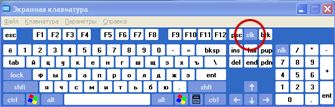
Примечание: Чтобы закрыть экранную клавиатуру, щелкните X в правом верхнем углу экранной клавиатуры.
Устранение неполадок с режимом SCROLL LOCK
Определить, что режим SCROLL LOCK включен, можно по надписи Scroll Lock в строке состояния Excel.
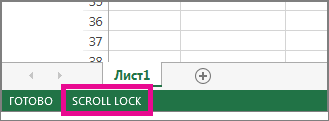
Если похоже, что режим SCROLL LOCK включен, однако надпись Scroll Lock в строке состояния Excel отсутствует, возможно, строка состояния настроена таким образом, чтобы не отображать состояние этого режима. Чтобы определить, так ли это, щелкните строку состояния Excel правой кнопкой мыши. Найдите флажок слева от параметра Scroll Lock. Если он не установлен, то при включенном режиме SCROLL LOCK в строке состояния Excel не будет отображаться надпись Scroll Lock. Чтобы она отображалась, просто установите флажок.
Как отключить scroll lock
Помогите отключить Scroll Lock на ноутбуке Lenovo ThinkPad X100e?
Для того, чтобы ответить на вопрос, требуется авторизоваться или зарегистрироваться
Лучший ответ
ххх 28 января 2012
Эм, а на клавишу скролл лок на клавиатуре нажимать пробывали?) Или она не работает?
Start->Accessories->Ease of Access->On-Screen Keyboard появляется виртуальная клавиатура, на ней ЕСТЬ Scroll Lock
можно и просто Fn-C нажать
- Ответ понравился: 2
What is a scroll lock?
Plus Tier Benefits
• Save up to an extra 6% on Think everyday pricing
• Purchase up to 25 systems per order (20 more than Lenovo.com)
• Spend $50K, advance for free to Elite Tier with increased benefits
• Take advantage of flexible payment options with TruScale Device as a Service. Learn More >
Elite Tier Benefits
• Save up to an extra 7% on Think everyday pricing
• Purchase up to 50 systems per order (45 more than Lenovo.com)
• Take advantage of flexible payment options with TruScale Device as a Service. Learn More >
Partner Benefits
• Access to Lenovo’s full product portfolio
• Configure and Purchase at prices better than Lenovo.com
View All Details >
more to reach
Congratulations, you have reached Elite Status!
Pro for Business
TEMPORARILY UNAVAILABLE
DISCONTINUED
Temporary Unavailable
Cooming Soon!
. Additional units will be charged at the non-eCoupon price. Purchase additional now
We’re sorry, the maximum quantity you are able to buy at this amazing eCoupon price is
Sign in or Create an Account to Save Your Cart!
Sign in or Create an Account to Join Rewards
Temporarilyunavailable
Discontinued
comingsoon
minicart_error_please_view
Your cart is empty! Don’t miss out on the latest products and savings — find your next favorite laptop, PC, or accessory today.
item(s) in cart
Some items in your cart are no longer available. Please visit cart for more details.
has been deleted
Please review your cart as items have changed.
Contains Add-ons
Proceed to checkout
Popular Searches
What are you looking for today?
Quick Links
Recent Searches
Hamburger Menu
Lenovo Pro Business Store arrow-top Created with Sketch.
Accessibility
Sales:
Order Support:
Lenovo Pro Business Store arrow-top Created with Sketch.
Accessibility
Sales:
Order Support:
Lenovo Pro Business Store arrow-top Created with Sketch.
Accessibility
Sales:
Order Support:
Lenovo Pro Business Store arrow-top Created with Sketch.
Accessibility
Sales:
Order Support:
Lenovo Pro Business Store arrow-top Created with Sketch.
Accessibility
Sales:
Order Support:
Lenovo Pro Business Store arrow-top Created with Sketch.
Accessibility
Sales:
Order Support:
Servers & Storage
Solutions & Services
About Lenovo
skip to main content
Sign In / Create Account
Sign in / Create Account
Keep track of your wishlist, orders, and My Lenovo rewards, all in one place
My Account Access your orders, subscriptions, saved carts, rewards balance, and profile
Wishlist Create a wishlist of your favorite products
Rewards Create an account to earn or view your rewards
Orders View & track your orders
Product Registration Register your product and/or update your warranty dates
My Lenovo Rewards
Sign In / Create Account
Sign in / Create Account
Keep track of your wishlist, orders, and My Lenovo rewards, all in one place
My Account Access your orders, subscriptions, saved carts, rewards balance, and profile
Wishlist Create a wishlist of your favorite products
Rewards Create an account to earn or view your rewards
Orders View & track your orders
Product Registration Register your product and/or update your warranty dates
My Lenovo Rewards
Sign In / Create Account
Sign in / Create Account
Keep track of your wishlist, orders, and My Lenovo rewards, all in one place
My Account Access your orders, subscriptions, saved carts, rewards balance, and profile
Wishlist Create a wishlist of your favorite products
Rewards Create an account to earn or view your rewards
Orders View & track your orders
Product Registration Register your product and/or update your warranty dates
My Lenovo Rewards
Sign In / Create Account
Sign in / Create Account
Keep track of your wishlist, orders, and My Lenovo rewards, all in one place
My Account Access your orders, subscriptions, saved carts, rewards balance, and profile
Wishlist Create a wishlist of your favorite products
Rewards Create an account to earn or view your rewards
Orders View & track your orders
Product Registration Register your product and/or update your warranty dates
My Lenovo Rewards
Sign In / Create Account
Sign in / Create Account
Keep track of your wishlist, orders, and My Lenovo rewards, all in one place
My Account Access your orders, subscriptions, saved carts, rewards balance, and profile
Wishlist Create a wishlist of your favorite products
Rewards Create an account to earn or view your rewards
Orders View & track your orders
Product Registration Register your product and/or update your warranty dates
My Lenovo Rewards
Sign In / Create Account
Sign in / Create Account
Keep track of your wishlist, orders, and My Lenovo rewards, all in one place
My Account Access your orders, subscriptions, saved carts, rewards balance, and profile
Wishlist Create a wishlist of your favorite products
Rewards Create an account to earn or view your rewards
Orders View & track your orders
Product Registration Register your product and/or update your warranty dates
My Lenovo Rewards
Laptops by Type
Laptops by Use
Laptops by Brand
Best Selling Laptops
Quick links
Desktops by Type
Desktops by Use
Desktops by Brand
Best Selling Desktops
Quick links
Workstations
Workstations by Type
Workstations by Brand
Best Selling Workstations
Quick links
Accessories & Software
Accessories by Category
Quick Links
Monitors by Size
Monitors by Use
Monitors by Resolution & Shape
Quick Links
Tablets & Phones
- Explore TabletsAndroid TabletsTablets for BusinessTablet AccessoriesTablet DealsShop All Tablets
- Explore SmartphonesThinkPhone by MotorolaMoto G SeriesMoto Edge SeriesMoto CarePhone AccessoriesSmartphone Deals
Best Selling Tablets
Servers & Storage
- Explore ServersRack ServersTower ServersEdge ServersBlade ServersMission Critical ServersHigh-Density ServersOptions & Accessories
- Explore StorageUnified StorageStorage-Area NetworkDirect-Attached StorageTape StorageOptions & Accessories
- Explore SDIThinkAgile HX Series (with Nutanix)ThinkAgile MX Series (with Microsoft)ThinkAgile SX Series (with Microsoft)ThinkAgile VX Series (with VMware)
- Explore NetworkingEthernet & Converged Switch ModulesEthernet & Converged AdaptersFibre Channel Switch Modules and AdaptersInfiniband Switches & Networking
- Explore SoftwareInfrastructure SoftwareManagement SoftwareLenovo Open Cloud AutomationCloud Marketplace
Home & Office
- Explore FurnitureDesksOffice Chairs & SeatingBookcasesTablesBoardsShop All Furniture
- Office SuppliesOffice AccessoriesNotetakingWritingCleaning ProductsStorageBindersShreddersShop All Office Supplies
- Smart OfficeConference CamerasPresentation Remote ControllersPrinters & ScannersThinkSmart BarSpeakersThinkReality Smart GlassesShop All ThinkSmart Office Devices
Smart Devices
Other Deals
Membership & Programs
Partners/Alliances
More Solutions
Business Solutions
Explore by Processor
Software-Defined Infrastructure
Cloud Solutions
Hyperconverged
Warranty Upgrade
Genuine Lenovo Parts
PC Services
Deployment Services
Managed Services
Sustainability Services
Services by Industry
Data Center Services
Solutions By Topic
Customer Support
Order Support
Technical Support
Sales Support
For Business
Order Support
For Business
Technical Support
Track Your Order
Warranty Lookup
Who We Are
Our Leaders
Smarter Technology For All
Diversity & Inclusion
Sustainability
Compliance
Lenovo Foundation
Lenovo News
Investor Relations
- Black Friday Starts Now! Save up to off. Free shipping sitewide. Shop Now >
- Need it today? Buy online, pick up select products at Best Buy. Shop Pick Up >
- Earn 3%-9% in rewards and get free expedited delivery on select products when joining My Lenovo Rewards. Join for Free >

Want a laptop that has it all?
- Superior performance where you need it most
- Communicate confidently with built-in intelligence
- Nearly 3X faster internet with Intel® Wi-Fi 6/6E (Gig+)1
- Fast-charging, long-lasting battery
Laptops. Evolved.
1 Versus standard Wi-Fi. Subject to router requirements and available signal.
Details at intel.com/PerformanceIndex (connectivity). Results may vary. Details at intel.com/evo.
© Intel Corporation.
What is a scroll lock?
Scroll lockis a feature found on some computer keyboards that allows you to lock the scroll bar so you can use your arrow keys to navigate any document without accidentally moving the page. Traditionally, it is located in between the Control and Alt keys on your keyboard. When scroll lock is enabled, a light will come on to indicate that it’s active.
How do I turn off scroll lock?
The easiest way to turn off scroll lock depends on your keyboard and operating system. On some keyboards there may be an LED indicator for scroll lock, which you can toggle by pressing the «Scroll Lock» key. If you don’t have an LED indicator, you can press the combination of “Shift” + “F14″ (on Windows) or «fn” + “F12” (on Mac).
What does scroll lock do?
Scroll lock allows you to navigate any document using the arrow keys without accidentally moving or scrolling through the page. This is especially helpful when working with long documents as it lets you easily move around without having to move your fingers away from their usual positions on the keyboard.
Is there a way to enable or disable scroll lock without pressing its dedicated key?
Yes, there are several ways to enable or disable scroll lock without pressing its dedicated key depending on your keyboard and operating system. You can go into your keyboard settings and enable or disable it from there, use a shortcut like “Shift” + “F14″ on windows or even just by clicking the corresponding menu item in most text editors such as Microsoft Word and Excel.
Why would I need to use scroll lock?
You might need to use scroll lock if you want to navigate large documents quickly without having to manually move up and down with your mouse wheel or arrow keys while keeping the cursor positioned at its current location. It also prevents page jumping when using arrow keys, so it’s very handy if you’re trying to stay focused on a specific part of a document as you navigate through it.
How does this help me when inputting data into an Excel spreadsheet?
When entering data into an Excel spreadsheet, enabling scroll lock can be extremely useful because it prevents accidental movement of cells while typing values in them. This means that all data will remain in the same column or row until manually moved otherwise by disabling scroll lock– giving more control over where values are being entered in large sheets with multiple columns and rows of data.
Does scroll lock affect other programs aside from Microsoft Word or Excel?
Scroll lock affects almost all types of programs where navigation with arrow keys takes place such as Notepad++ and web browsers like Firefox or Chrome as well as text editors like Sublime Text editor etc., but usually won’t affect programs like Photoshop where navigational features are handled differently than via traditional arrow-key commands.
Where else might I find scroll lock besides my laptop or desktop keyboard?
Besides laptop or desktop keyboards, many gaming consoles also have support for scroll lock which often behaves similarly — allowing smoother navigation in games and saving time while navigating menus instead of having to constantly reposition the character before entering new areas of maps etc. Some remote controls also feature a button labeled «scroll lock» – although this serves more of an aesthetic purpose than actually performing any real function beyond illuminating itself momentarily when pressed.
What strategies can I employ to prevent accidental scroll lock activation?
The best way to prevent accidentally activating scroll lock is to first and foremost become familiar with your keyboard and its layout. That way if you ever stumble across a «Scroll Lock» button, you will know what it is without having to experiment. Additionally, it might also help to disable the feature from within your system’s settings as this will ensure that it can’t be accidentally activated in the future.
Is there any downside to using scroll lock?
The main downside of scroll lock is that it can be easily forgotten which results in navigation issues and confusion as soon as you start moving around with the arrow keys as nothing appears to happen. Additionally, some programs might not recognize keyboard commands if scroll lock has been enabled — so if you encounter any strange behavior while trying to use certain shortcuts, make sure scroll lock is disabled first.
How do I turn on or off scroll lock?
To turn on or off scroll lock on most keyboards, you can press the scroll lock key (often abbreviated as ScrLk) located in the top right corner of your keyboard. Some laptops might require you to press a combination of Fn and another key to activate/deactivate scroll lock.
Why does my keyboard have a scroll lock key if it’s not used anymore?
Although its original purpose is no longer relevant for most users, some programs still use the scroll lock key for other purposes. For example, Microsoft Excel uses it to change the behavior of certain commands like Ctrl+Arrow keys.
How does scroll locking work in web browsers?
In web browsers like Chrome or Firefox, scrolling happens automatically when you move your mouse wheel or swipe up or down on a touchpad. Scroll lock doesn’t affect this behavior unless you’re using an external mouse with a dedicated scroll wheel that has its own button for enabling/disabling scrolling.
What is KVM Switch and how does it relate to scroll lock?
A KVM switch (short for Keyboard-Video-Mouse switch) allows multiple computers to share one set of peripherals (keyboard/mouse/monitor). The scroll lock key plays an important role in switching between computers connected via KVM switch — pressing it twice quickly will activate «hotkey» mode where you can easily switch between connected devices using designated keystrokes.
Why does my computer beep when I press scroll lock?
Some computers are configured to emit an audible beep when certain keys are pressed, including Scroll Lock. This feature can usually be disabled through your computer’s settings.
Can I customize what functions are associated with my keyboard’s scroll lock key?
In some cases, yes. Depending on your operating system and keyboard model, you may be able to customize what actions or functions are associated with the scroll lock key using third-party software or built-in settings options.
What other functions can I access with my keyboard’s function (Fn) key?
Depending on your specific keyboard model and manufacturer, there may be several different functions that you can access using your Fn key in combination with other keys on your board. Some common examples include adjusting screen brightness or volume levels or accessing media playback controls.