Почему текст выводится 2 раза?
Почему при неправильном вводе, в консоль выводится «Попытайтесь ее угадать: Попытайтесь ее угадать: «??
Почему 2 раза?
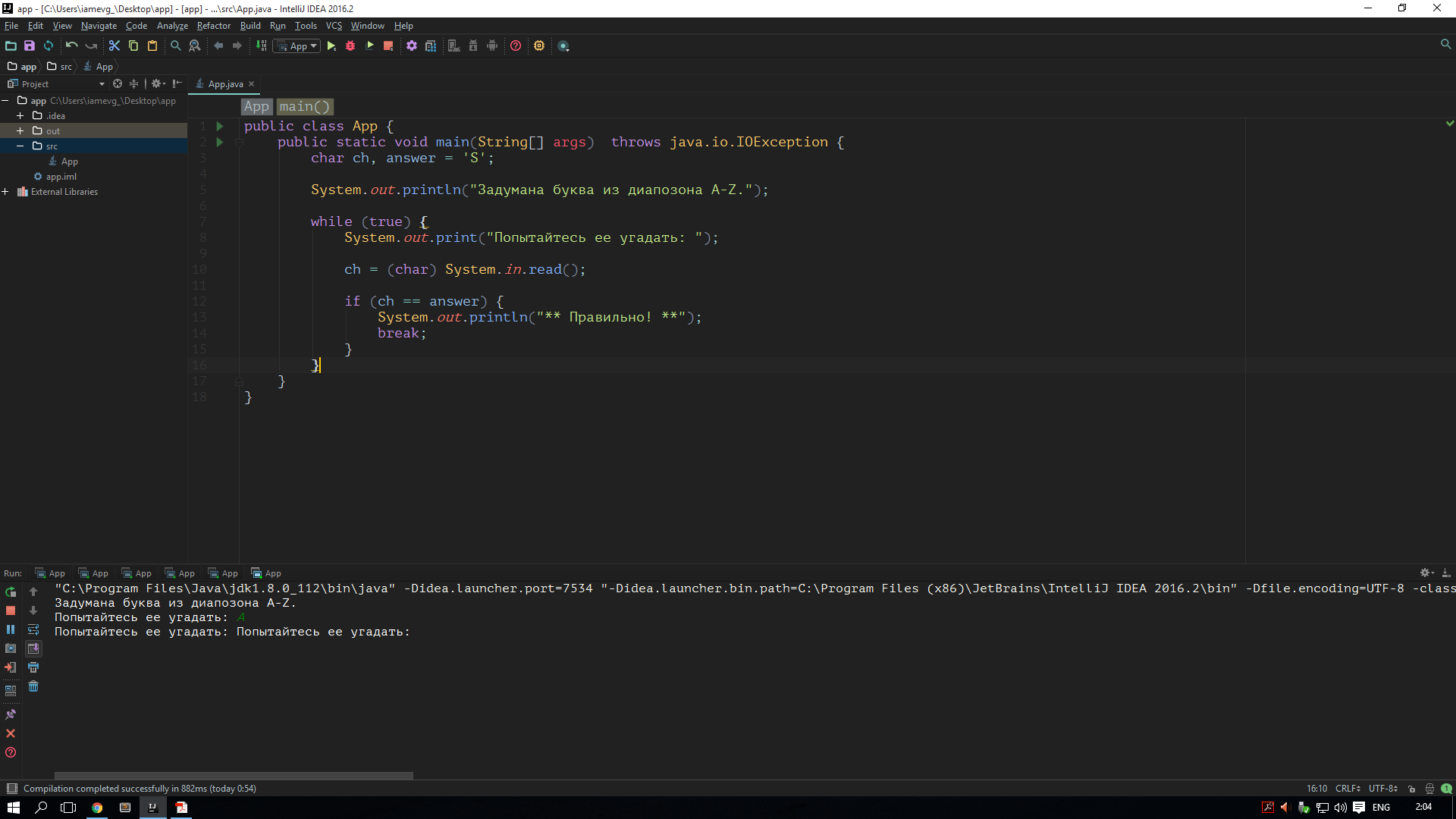
Вывод: Ссылка на большой размер
- Вопрос задан более трёх лет назад
- 1060 просмотров
Комментировать
Решения вопроса 0
Ответы на вопрос 4
В таких случаях нужно запускать дебаггер.
А так потому что ты вводишь 2 символа, а не один. Какую-то букву и символ переноса строки.
Ответ написан более трёх лет назад
Нравится 1 2 комментария

gleendo @evgeniy8705 Автор вопроса
Максим А как убрать этот перенос строки. Без нажатия Enter же символ не попадет в буфер
evg_: Можно как написал Ivan Sokolov, а можно читать не символ, а строку целиком, вот так:
public class App < public static void main(String[] args) throws java.io.IOException < String answer = "S"; System.out.println("Задумана буква из диапозона A-Z."); BufferedReader reader = new BufferedReader(new InputStreamReader(System.in)); while (true) < System.out.print("Попытайтесь ее угадать: "); String line = reader.readLine(); if (line.equals(answer)) < System.out.println("** Правильно! **"); break; >> > >А что должно выводить? 🙂
Зашел в цикл, вывел строку, считал чар.
Если чар не тот, то снова вывод строки и считывание чара, иначе иф и выход из цикла.
Ответ написан более трёх лет назад
gleendo @evgeniy8705 Автор вопроса
gr8web Ну оно так и должно работать по идеи. Но у меня получается что если неравильно введешь символ то выводится не «Попытайтесь ее угадать:», а «Попытайтесь ее угадать: Попытайтесь ее угадать:»
Anton @MoonMaster
Программист и этим все сказано
Потому что у вас так цикл работает. Когда цикл только запускается while (true) то выводится соответствующее сообщение. Потом вы запрашиваете символ. Если он некорректен, то вы выводите сообщение, но из цикла вы не выходите. Вы только выходите из секции if.
Ответ написан более трёх лет назад
gleendo @evgeniy8705 Автор вопроса
Anton Я делаю выход из цикла только после удачного ввода символа. Зачем выходит если символ введен неудачно? Нужно опять дать возможность пользователю ввести символ. Для этого опять идет итерация цикла, должна вывести «Попытайтесь ее угадать:» и запросить ввод. Но выводится не один раз, а два раза подряд «Попытайтесь ее угадать: Попытайтесь ее угадать:»
Закрывающийся тег php ?>
Если файл содержит только код PHP, предпочтительно опустить закрывающий тег в конце файла. Это помогает избежать добавления случайных символов пробела или перевода строки после закрывающего тега PHP, которые могут послужить причиной нежелательных эффектов, так как PHP начинает выводить данные в буфер при отсутствии намерения у программиста выводить какие-либо данные в этой точке скрипта.
Отслеживать
122k 24 24 золотых знака 124 124 серебряных знака 299 299 бронзовых знаков
ответ дан 23 янв 2013 в 16:29
7,418 17 17 серебряных знаков 22 22 бронзовых знака
И так и так будет правильно. Закрывающие теги обязательны для html файлов содержащих php код(хотя правильней будет сказать «php файлов содержащих html код). Но если у Вас файл только с php кодом, то закрывающий тег ставить не обязательно.
Если вдаваться в подробности, то для вывода php, серверу нужно не просто отдать браузеру файл «как есть»(как в случае с html) а вызвать php интерпретатор. PHP интерпретатор будет считывать(и выполнять) код до тех пор пока не встретит закрывающий тег или пока не встретит конец файла. Так что можете использовать и не использовать закрывающие теги.
Отслеживать
ответ дан 23 янв 2013 в 16:36
3,724 13 13 серебряных знаков 16 16 бронзовых знаков
То есть в современном PHP 8+ нет нужды опускать закрывающий тег, как это расписано здесь stackoverflow.com/questions/4410704/… ?
Using PHP Output Buffering In Templating
In a project I’m working on, I needed to render a Vue application inside a Drupal 7 (D7) site. Drupal handled the routing and asset loading while Vue handled everything else. It was important to try and not use Drupal for anything other than routing since D7 is approaching EOL in 2021. It was also an exercise in using more core PHP functionality rather than doing what I’m used to and snuggling up inside a Drupal function blanket for most coding tasks.
I was so far up D7’s arse, I even thought asset loading had to be done within a D7 menu callback using something like drupal_add_js() or drupal_add_css() . I now know that I could accomplish my task by only using a few hook_menu() routing entries pointing to a few callbacks. I’m not saying you should leave out Drupal functions while writing your code, but in my specific case, it was useful to make my code portable for now. Chances are that you can start taking the framework out of your code, and if you think you can going forward, then you should.
I will say that I had fun taking the CMS out of my code while working on my solution and that I learned a bit more about core PHP functionality I’ll remember just in case it’s useful in the future. In the rest of this post, I’ll go through my frustration when initially trying to organize my code and pass data into template files and how PHP’s output buffering functions came to the rescue.
Rendering Output Without Using The CMS
When you run a PHP script, the code executes and the output is sent out to whatever initiated the script to handle the results. I click a link on a website, you run the code and hand me back a page. The PHP script runs through a set of functions and at the end, some function echoes out all the accumulated output as HTML.
Normally in a CMS, a routing system will hand off to a controller that prepares data and then hands it to a theming layer to construct the HTML that is sent back to the browser. If you don’t want to use the theme layer of the CMS, then you have to figure out how you want to include template files in order to hand back output to the CMS. In my case, I certainly did not want to use Drupal theming functions to render the Vue templates, but I had a little bit of a hard time figuring out how to pass data into my template files.
// In a hook_menu() routing callback. // Initialize output container.
$output = '';// Do data thing.
$data = json_encode($smart_thing->get_data());// Include some template files using $data as variables.
include 'templates/vue.tpl.php';
include 'templates/component_one.vue.php';
include 'templates/component_two.vue.php';// Return output to the CMS. but where is output aggregated?
return $output;// In templates/component_one.vue.php
.
I basically wanted to use my own set of services to manipulate and gather data and then let Vue take over in the template files with some data inserted server-side before the page loads. This was the simplest way I could see to organize my template files and pass data into them.
The template files I created had a vue.php extension to them, and they were meant to resemble tpl.php files you would use within D7’s theme layer. All of the parts of a Vue Single File Component are included: CSS styles, the template, and the accompanying component definition attached to Vue via Vue.component() .
But when I tried to include the template files all I saw on the page was a string of all the code in the template file. There was no way for me to capture the output into a variable and then hand the HTML back to Drupal in order for it to does its thing and get around to sending something back to the user eventually.
Use Output Buffering To Organize Template Files
The missing piece of the equation for me was a concept called output buffering. Instead of immediately sending output back to the caller of the script, the output buffer holds the output hostage allowing for any other PHP code to interact with it before returning the output to its rightful recipient.
In my case, I totally wanted to hold the included template files into a buffer that I could grab the contents of and return as a single string of HTML when the time came. I needed to pass in variables to the component template files, but I didn’t want to include all of the component template files in one callback function. That would be very messy and hard to maintain.
// Start output buffer.
ob_start();// Initialize output container.
$output = '';// Do data thing.
$data = json_encode($smart_thing->get_data());// Include some template files using $data as variables.
include 'templates/vue.tpl.php';
include 'templates/component_one.vue.php';
include 'templates/component_two.vue.php';// Get contents of buffer including how $data is used inside of templates.
$output = ob_get_contents();// Close the buffer and clear the contents.
ob_end_clean();// Return HTML back to the CMS.
return $output;// In templates/component_one.vue.php
.
As you can see, the code from my first attempt remains mostly the same except that it is wrapped in output buffering functions. In this way, the buffer holds the output of the included files until I need to grab them. I could have done all sorts of things with the aggregated output before grabbing it to return to the CMS, but in my case, all I needed to do was pass some variables to be printed inside some components.
Drupal 7’s Use of Output Buffering For Themes
When I first started writing this post, I was thinking: “This isn’t the right way to do anything…I should be doing this in a more best practice way…I bet only hacky people use output buffering for templating’s sake.”
Well, I have a lot of respect for the Drupal core team members so when I saw ob_start() in the theme layer, I didn’t feel so bad. If you’re not convinced by that and you say “Drupal sux” well then maybe you’ll be convinced when you see it used in Twig’s cached template output. Everybody in PHP loves Symfony so that made me feel even more like I was not doing anything entirely stupid.
// Drupal 7’s theme layer.
function theme_render_template($template_file, $variables) // Extract the variables to a local namespace
extract($variables, EXTR_SKIP);

// Start output buffering
ob_start();

// Include the template file
include DRUPAL_ROOT . '/' . $template_file;

// End buffering and return its contents
return ob_get_clean();
>// In a Twig cached template file.
protected function doDisplay(. ) . setup code
ob_start();
. more code
// Last line of function.
echo trim(preg_replace('/>\s+>
As you can see, the Drupal theme function is doing basically the exact same thing as I am doing in my code except that it nicely extracts the variables from the $variables array. I don’t like the extract() function, but that’s another story. ob_get_clean() combines my use of ob_get_contents() and ob_end_clean() . I prefer to be more explicit with what my code is doing, and I think it is clearer when you split getting the contents of the buffer away from closing it down. Since ob_start() has no similar equivalent, why not match a closing function to it instead of combining it with gathering contents? But which output buffering functions you choose to use is up to you. I don’t think it goes beyond a stylistic preference, but there can be issues with memory management and ob_get_contents() .
I’m less sure about what’s going on with the Twig template, but it is echoing out some HTML and looks like it is inserting variables amongst the echoing statements. Without using the output buffering functions here, I think you would have to $output .= ‘
something
‘; your way through the template, and stringing together HTML output like that sucks.
Commonly Used For Setting Headers and Cookies
The most common use case for output buffering in PHP is for sending header information after the request has started. When PHP is preparing a response to send data back to the browser, it groups the output in chunks so that the header information comes before any output. I have little knowledge of this area so I’ll let a great StackOverflow answer speak for me.
The page/output always follows the headers. PHP has to pass the headers to the webserver first. It can only do that once. After the double linebreak it can nevermore amend them.
When PHP receives the first output ( print , echo , ) it will flush all collected headers. Afterwards it can send all the output it wants. But sending further HTTP headers is impossible then.
One common example is to set header information after performing some logic or gathering the first output sent to the browser via an HTML tag or an echo statement.
/**
* Invokes hook_boot(), initializes locking system, and sends HTTP headers.
*/
function _drupal_bootstrap_page_header() bootstrap_invoke_all('boot');

if (!drupal_is_cli()) ob_start();
drupal_page_header();
>
>
In Drupal 7, an output buffer is started and then Drupal takes over to handle setting header output inside the buffer. It is confusing to figure out where the output buffer is closed, but with functions like drupal_add_http_header() it would be easy for a developer to try and modify a header after some output has been generated by a script.
. stuff
?>header("Content-type: text/html");
?>
Even that blank line in between the PHP tags is considered output and will cause an error when the header() function is used in the next code block.
WordPress Turns It Up To 11
When I first started writing this post, I didn’t have any examples of where output buffering was used inside of a CMS. I was just learning about basic PHP functionality that matched my use case and needs. I showed you where output buffering is used in Drupal 7 and in Twig templates, but my first example of output buffering within a PHP framework came from WordPress (WP)…and they really like to use output buffering in scary ways a lot of the time.
To be fair, sometimes that is the only way for a WP developer to change the output that has already been printed to the screen by another output buffer. Since output buffers are used all over the place, it’s also necessary to use them in order to return your output to the parent output buffer.
What do I mean by “parent output buffer”? The plot thickens…Output buffering in PHP would be a lot more boring if you could only have one buffer going at a time. However, you can actually nest the buffers within each other.
ob_start();
echo ob_get_level();
echo 'foo
';
//. lots of stuff happens.
ob_start();
echo ob_get_level();
echo 'bar.
';
$out_2 = ob_get_contents();
ob_end_clean();
echo ob_get_level();
$out_1 = ob_get_contents();
ob_end_clean();
echo $out_1;
echo "\n";
echo $out_2;// Prints the following.
1foo
1
2bar.
Each bit of content echoed existed in a different buffer level before it was output to the screen eventually. I believe that PHP closes and flushes the output of all unclosed buffers at the end of script execution, but the nesting levels allow for the return of buffered output that may contain HTML or whitespace and still have WP not send any output back to the browser.
final public function render( $container_context = array() ) $partial = $this;
$rendered = false;

if (!empty( $this->render_callback)) ob_start();
$return_render = call_user_func( $this->render_callback, $this, $container_context );
$ob_render = ob_get_clean();

if ( null !== $return_render && '' !== $ob_render ) _doing_it_wrong( __FUNCTION__, __( 'Partial render must echo the content or return the content string (or array), but not both.' ), '4.5.0' );
>

/*
* Note that the string return takes precedence because the
* $ob_render may just\ include PHP warnings or notices.
*/
$rendered = null !== $return_render ? $return_render : $ob_render;
>
In that code snippet, if the rendered output is not null then it is returned to the caller. If it is null then the buffer is returned which can contain PHP notices or warnings.
This stipulation brings up another good point and use of output buffering. Have you ever been to a site where something goes wrong in the code and you see some PHP warnings on a half-working page? I know I have. When output buffering is used, you can capture those notices so that they aren’t emitted to the user. Instead, you can send them a nicer message when an error is encountered.
I think I saw the use of that method in D7’s codebase, but I forget where that was. In lieu of an example there, I’ll give you a resource that has examples of where and how WP developers use output buffering in themes to purportedly “help developers prevent conflicts.” I don’t know what that means, but I think looking at some of the examples will expand your knowledge on output buffering.
ob_start
Эта функция включает буферизацию вывода. Если буферизация вывода активна, никакой вывод скрипта не отправляется (кроме заголовков), а сохраняется во внутреннем буфере.
Содержимое этого внутреннего буфера может быть скопировано в строковую переменную, используя ob_get_contents() . Для вывода содержимого внутреннего буфера следует использовать ob_end_flush() . В качестве альтернативы можно использовать ob_end_clean() для очистки содержимого буфера.
Внимание
Некоторые веб-серверы (например, Apache) изменяют рабочую директорию скрипта при вызове callback-функции. Вы можете вернуть её назад, используя chdir(dirname($_SERVER[‘SCRIPT_FILENAME’])) в callback-функции.
Буферы вывода помещаются в стек, то есть допускается вызов ob_start() после вызова другой активной ob_start() . При этом необходимо вызывать ob_end_flush() соответствующее количество раз. Если активны несколько callback-функций, вывод последовательно фильтруется для каждой из них в порядке вложения.
Если буферизация вывода всё ещё активна, когда скрипт завершает работу, PHP автоматически выводит содержимое.
Список параметров
Можно задать необязательный параметр callback . Эта функция принимает строку в виде аргумента и должна также вернуть строку. Она вызывается при сбросе (отправке) или очистке (с помощью ob_flush() , ob_clean() или подобных функций) или если буфер вывода сбрасывается в браузер по окончанию запроса. При вызове функции callback , она получает содержимое буфера и, как ожидается, должна вернуть обновлённое содержимое для буфера вывода, которое будет отправлено браузеру. Если callback не является допустимой функцией, то эта функция вернёт false . Описание функции для этого параметра:
handler ( string $buffer , int $phase = ? ): string
buffer Содержимое буфера вывода. phase Битовая маска констант PHP_OUTPUT_HANDLER_* .
Если callback вернёт false , то оригинальная информация отправится в браузер без изменений.
Параметр callback может быть игнорирован передачей значения null .
ob_end_clean() , ob_end_flush() , ob_clean() , ob_flush() и ob_start() не могут вызываться из callback-функций, так как их поведение непредсказуемо. Если вы хотите удалить содержимое буфера, то верните «» (пустую строку) из callback-функции. Вы также не можете использовать функции буферизации вывода, такие как print_r($expression, true) или highlight_file($filename, true) из callback-функции.
Замечание:
Функция ob_gzhandler() была введена для облегчения отправки gz-кодированных данных браузерам, поддерживающим сжатые веб-страницы. ob_gzhandler() определяет тип кодировки содержимого, принимаемый браузером, и возвращает вывод соответствующим образом.
chunk_size
Если передан необязательный параметр chunk_size , то буфер буден сброшен после любого вывода, превышающего или равного по размеру chunk_size . Значение по умолчанию 0 означает, что функция вывода будет вызвана, когда буфер будет закрыт.
Параметр flags является битовой маской, которая управляет операциями, которые можно совершать над буфером вывода. По умолчанию она позволяет буферу вывода быть очищенным, сброшенным и удалённым, что равносильно значению PHP_OUTPUT_HANDLER_CLEANABLE | PHP_OUTPUT_HANDLER_FLUSHABLE | PHP_OUTPUT_HANDLER_REMOVABLE или PHP_OUTPUT_HANDLER_STDFLAGS как сокращение этой комбинации.
Каждый флаг управляет доступом к набору функций, как описано ниже:
| Константа | Функции |
|---|---|
| PHP_OUTPUT_HANDLER_CLEANABLE | ob_clean() , ob_end_clean() и ob_get_clean() . |
| PHP_OUTPUT_HANDLER_FLUSHABLE | ob_end_flush() , ob_flush() и ob_get_flush() . |
| PHP_OUTPUT_HANDLER_REMOVABLE | ob_end_clean() , ob_end_flush() и ob_get_flush() . |
Возвращаемые значения
Возвращает true в случае успешного выполнения или false в случае возникновения ошибки.
Примеры
Пример #1 Пример callback-функции, определённой пользователем
function callback ( $buffer )
// заменить все яблоки апельсинами
return ( str_replace ( «яблоки» , «апельсины» , $buffer ));
>
Результат выполнения данного примера:
Это всё равно что сравнить апельсины и апельсины.
Пример #2 Создание нестираемого буфера вывода
ob_start ( null , 0 , PHP_OUTPUT_HANDLER_STDFLAGS ^ PHP_OUTPUT_HANDLER_REMOVABLE );
Смотрите также
- ob_get_contents() — Возвращает содержимое буфера вывода
- ob_end_clean() — Очистить (стереть) буфер вывода и отключить буферизацию вывода
- ob_end_flush() — Сбросить (отправить) буфер вывод и отключить буферизацию вывода
- ob_implicit_flush() — Включение/выключение неявного сброса
- ob_gzhandler() — callback-функция, используемая для gzip-сжатия буфера вывода при вызове ob_start
- ob_iconv_handler() — Преобразует символы из текущей кодировки в кодировку выходного буфера
- mb_output_handler() — Callback-функция, преобразующая кодировку символов в выходном буфере
- ob_tidyhandler() — Функция обратного вызова ob_start для восстановление буфера