Что такое SQL-инъекция на пальцах
В одной из предыдущих статей мы рассказывали про такой тип уязвимостей, как XSS. В этой же статье мы решили поговорить о том, что такое SQL-инъекция.
SQL-инъекция — это довольно популярный вид уязвимости, существующей на стороне сервера. Она возможна в случае, когда сервер для хранения информации использует базу данных на основе SQL: MySQL, PostgreSQL, MSSQL и т. д.
Суть уязвимости в следующем. Сервер может подставлять данные, которые пришли от пользователя, прямо в SQL запрос. Например (код на PHP):
$id = $REQUEST[‘id’];
$q = “select * from Users where > Database::query($q);
Здесь id берется из запроса, который прислал клиент — веб-страница или мобильное приложение. Этот id становится частью SQL-запроса.
Ожидается, что от пользователя придет число в качестве id. Но технически пользователь может отправить любые данные. И злоумышленники этим пользуются.
Особенность SQL-движков в том, что они могут выполнять несколько запросов подряд. Для этого следует разделить запросы точкой с запятой.
Допустим, от пользователя придет id равный следующему значению:
5; drop table Users
Если подставить такой id без обработки в запрос выше, получится два запроса:
select * from Users where drop table Users
В итоге злоумышленнику удастся удалить таблицу Users. Подобным способом сформированный запрос и является SQL-инъекцией.
Существует множество способов защитить базу данных от инъекций. Этим обычно занимаются разработчики. А задача тестировщика — проверить возможные места для атаки.
SQL инъекции. Проверка, взлом, защита
SQL инъекция — это один из самых доступных способов взлома сайта.
Суть таких инъекций – внедрение в данные (передаваемые через GET, POST запросы или значения Cookie) произвольного SQL кода. Если сайт уязвим и выполняет такие инъекции, то по сути есть возможность творить с БД (чаще всего это MySQL) что угодно.
Как вычислить уязвимость, позволяющую внедрять SQL инъекции?
Довольно легко. Например, есть тестовый сайт test.ru. На сайте выводится список новостей, с возможностью детального просомтра. Адрес страницы с детальным описанием новости выглядит так: test.ru/?detail=1. Т.е через GET запрос переменная detail передаёт значение 1 (которое является идентификатором записи в табице новостей).
Изменяем GET запрос на ?detail=1′ или ?detail=1″ . Далее пробуем передавать эти запросы серверу, т.е заходим на test.ru/?detail=1′ или на test.ru/?detail=1″.
Если при заходе на данные страницы появляется ошибка, значит сайт уязвим на SQL инъекции.
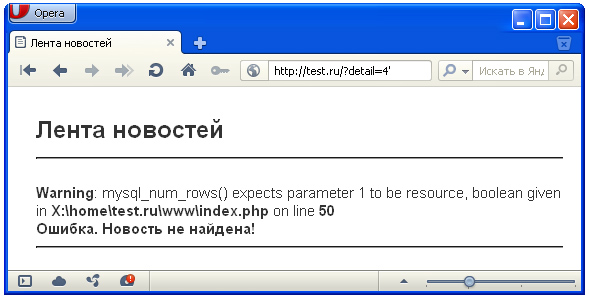
Пример ошибки, возникающей при проверке уязвимости
Возможные SQL инъекции (SQL внедрения)
1) Наиболее простые — сворачивание условия WHERE к истиностному результату при любых значениях параметров.
2) Присоединение к запросу результатов другого запроса. Делается это через оператор UNION.
3) Закомментирование части запроса.
Практика. Варианты взлома сайта с уязвимостью на SQL внедрения
Итак, у нас есть уже упоминавшийся сайт test.ru. В базе хранится 4 новости, 3 из которых выводятся. Разрешение на публикацию новости зависит от парметра public (если параметр содержит значение 1, то новость публикуется).
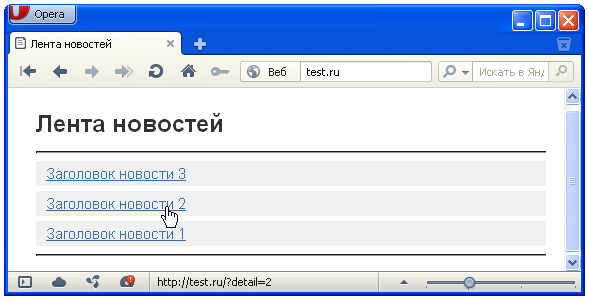
Список новостей, разрешённых к публикации
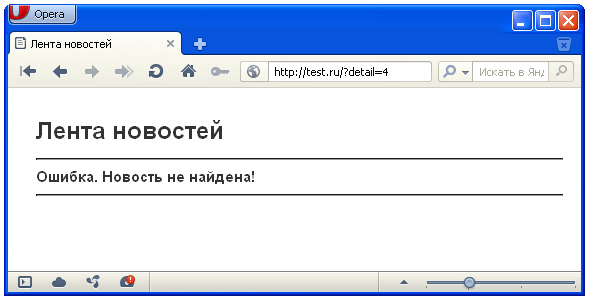
При обращении к странице test.ru/?detail=4, которая должна выводить четвёртую новость появляется ошибка – новость не найдена.
В нашем случае новость существует, но она запрещена к публикации.
Но так как мы уже проверяли сайт на уязвимость и он выдавал ошибку БД, то пробуем перебирать возможные варианты запросов.
В адресной строке плюс (+) выполняет роль пробела, так что не пугайтесь
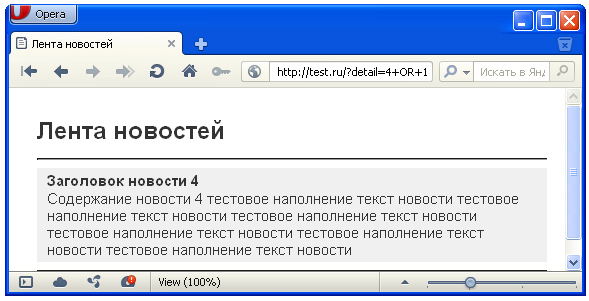
В итоге удача улыбнулась и два запроса (первый и третий) вернули нам детальное описание четвёртой новости
Разбор примера изнутри
За получение детального описания новости отвечает блок кода:
$detail_id=$_GET[‘detail’];
$zapros=»SELECT * FROM `$table_news` WHERE `public`=’1′ AND `id`=$detail_id ORDER BY `position` DESC»;
Мало того, что $detail_id получает значение без какой либо обработки, так ещё и конструкция `id`=$detail_id написана криво, лучше придерживаться `id`=’$detail_id’ (т.е сравниваемое значение писать в прямых апострофах).
Глядя на запрос, получаемый при обращении к странице через test.ru/?detail=4+OR+1
SELECT * FROM `news` WHERE `public`=’1′ AND `id`=4 OR 1 ORDER BY `position` DESC
становится не совсем ясно, почему отобразилась 4-ая новость. Дело в том, что запрос вернул все записи из таблицы новостей, отсортированные в порядке убывания сверху. И таким образом наша 4-ая новость оказалась самой первой, она же и вывелась как детальная. Т.е просто совпадение.
Разбираем запрос, сформированный при обращении через test.ru/?detail=4+UNION+SELECT+*+FROM+news+WHERE+id=4 .
Тут название таблицы с новостями (в нашем случае это news) бралось логическим перебором.
Итак, выполнился запрос SELECT * FROM `news` WHERE `public`=’1′ AND `id`=4 UNION SELECT * FROM news WHERE ORDER BY `position` DESC . К нулевому результату первой части запроса (до UNION) присоединился результат второй части (после UNION), вернувшей детальное описание 4-ой новости.
Защита от SQL инъекций (SQL внедрений)
Защита от взлома сводится к базовому правилу «доверяй, но проверяй». Проверять нужно всё – числа, строки, даты, данные в специальных форматах.
Числа
Для проверки переменной на числовое значение используется функция is_numeric(n);, которая вернёт true, если параметр n — число, и false в противном случае.
Так же можно не проверять значение на число, а вручную переопределить тип. Вот пример, переопределяющий значение $id, полученное от $_GET[‘id_news’] в значение целочисленного типа (в целое число):
$id=(int)$_GET[‘id_news’];
Строки
Большинство взломов через SQL происходят по причине нахождения в строках «необезвреженных» кавычек, апострофов и других специальных символов. Для такого обезвреживания нужно использовать функцию addslashes($str);, которая возвращает строку $str с добавленным обратным слешем (\) перед каждым специальным символом. Данный процесс называется экранизацией.
$a=»пример текста с апострофом ‘ «;
echo addslashes($a); //будет выведено: пример текста с апострофом \’
Кроме этого существуют две функции, созданные именно для экранизации строк, используемых в SQL выражениях.
Это mysql_escape_string($str); и mysql_real_escape_string($str);.
Первая не учитывает кодировку соединения с БД и может быть обойдена, а вот вторая её учитывает и абсолютно безопасна. mysql_real_escape_string($str); возвращает строку $str с добавленным обратным слешем к следующим символам: \x00, \n, \r, \, ‘, » и \x1a .
Магические кавычки
Магические кавычки – эффект автоматической замены кавычки на обратный слэш (\) и кавычку при операциях ввода/вывода. В некоторых конфигурациях PHP этот параметр включён, а в некоторых нет. Для того, что бы избежать двойного экранизирования символов и заэкранизировать данные по-нормальному через mysql_real_escape_string($str);, необходимо убрать автоматические проставленные обратные слеши (если магические кавычки включены).
Проверка включённости магических кавычек для данных получаемых из GET, POST или Куков организуется через функцию get_magic_quotes_gpc(); (возвращает 1 – если магические кавычки включены, 0 – если отключены).
Если магические кавычки вкючены (т.е обратные слеши добавляеются) и такое встречается чаще, то их нужно убрать. Это делается через функцию stripslashes($str); (возвращает строку $str без обратных слешей у кавычек и прямых апострофов).
В закючении привожу код с полной экранизацией строк для записи в БД
if(get_magic_quotes_gpc()==1)
$element_title=stripslashes(trim($_POST[«element_title»]));
$element_text=stripslashes(trim($_POST[«element_text»]));
$element_date=stripslashes(trim($_POST[«element_date»]));
>
else
$element_title=trim($_POST[«element_title»]);
$element_text=trim($_POST[«element_text»]);
$element_date=trim($_POST[«element_date»]);
>
$element_title=mysql_real_escape_string($element_title);
$element_text=mysql_real_escape_string($element_text);
$element_date=mysql_real_escape_string($element_date);
Статья была подготовлена на основе практических навыков по защите веб-систем. Теория дело хорошее, но практика важнее и главное она работает.
Защита от SQL инъекций в jdbc java
Часто вижу утверждения, что надо использовать PreparedStatement вместо обычного Statement , чтобы защититься от sql инъекций. Как он защищает?
Отслеживать
20.2k 6 6 золотых знаков 37 37 серебряных знаков 81 81 бронзовый знак
задан 4 дек 2017 в 19:56
4,912 2 2 золотых знака 12 12 серебряных знаков 29 29 бронзовых знаков
Только нужно помнить, что подготовленные запросы, кроме вашего кода, проходят еще и через сторонний (библиотеки и jdbc-драйверы). И если в этом стороннем коде подготовленные запросы реализованы через обычные (все собирается обратно в строку), то защиты от SQL инъекций не будет. Это довольно известная проблема в мире PHP PDO.
6 апр 2018 в 9:43
1 ответ 1
Сортировка: Сброс на вариант по умолчанию
Коротко, для нетерпеливых:
При использовании Statement строки запроса и значений складываются.
При использовании PreparedStatement имеется шаблон запроса и данные в него вставляются, с отражением кавычек.
Ниже подробнее с примерами.
Вступление.
Имеем такую простую таблицу с данными.
+-----------+----+--------+ | userName | id | pass | +-----------+----+--------+ | admin | 1 | admin | | user | 2 | pass | | chuchelo | 3 | elli | +-----------+----+--------+ Модель User , будет содержать имя и пароль, а так же метод логин, который спросит данные с консоли.
class UserLogin < String name; String pass; public UserLogin() < >public void login() < BufferedReader reader = null; try< reader = new BufferedReader(new InputStreamReader(System.in)); System.out.println("user name: "); name = reader.readLine(); System.out.println("pass: "); pass = reader.readLine(); >catch (IOException e) < e.printStackTrace(); >finally < if (reader != null) try < reader.close(); >catch (IOException e) < e.printStackTrace(); >> > Метод, который будет работать с обычным Statement :
UserLogin user = new UserLogin(); user.login(); try (Connection connect = MyConnection.getConnection()) < Statement statement = connect.createStatement(); String query = "SELECT userName, id, pass FROM users WHERE userName='" + user.name + "' AND pass = '" + user.pass + "'"; System.out.println(query); ResultSet resultSet = statement.executeQuery(query); while (resultSet.next())< System.out.printf("User: name=%s pass=%s\n", resultSet.getInt("id"), resultSet.getString("userName"), resultSet.getString("pass")); >MyConnection.closeConnect(); > catch (SQLException e)
Теперь если мы запустим этот метод и введем в консоль данные без инъекции:
user name: admin pass: admin User: name=admin pass=admin При этом сам запрос выглядит так:
SELECT userName, id, pass FROM users WHERE userName='admin' AND pass = 'admin'
Если допустить ошибку в имени или пароле, то данные выведены не будет.
Теперь попробуем использовать инъекцию( ‘ or’1’=’1 ), т.е. введем такие данные:
user name: admin' or'1'='1 pass: blabla То мы все равно получаем результат, несмотря на то, что пароль неверный:
User: name=admin pass=admin
При этом сам запрос теперь выглядит так:
SELECT userName, id, pass FROM users WHERE userName='admin' or'1'='1' AND pass = 'blabla'
т.к. выражение or’1’=’1′ всегда равно true , то даже без указания пароля мы получим все данные.
Как от этого защитит PreparedStatement ?
Метод который будет получать данные из базы с помощью PreparedStatement :
UserLogin user = new UserLogin(); user.login(); try (Connection connect = MyConnection.getConnection()) < String query = "SELECT userName, id, pass FROM users WHERE userName=? AND pass=?"; PreparedStatement statement = connect.prepareStatement(query); statement.setString(1, user.name); statement.setString(2, user.pass); System.out.println(statement); ResultSet resultSet = statement.executeQuery(); while (resultSet.next())< System.out.printf("User: name=%s pass=%s\n", resultSet.getInt("id"), resultSet.getString("userName"), resultSet.getString("pass")); >MyConnection.closeConnect(); > catch (SQLException e)
Все тоже самое, только заменили обычный Statement на PreparedStatement. Надеюсь вы на слово поверите, что при правильных данных мы получим верный результат, если нет то вот лог в консоли:
user name: user pass: pass User: name=user pass=pass Запрос: SELECT userName, id, pass FROM users WHERE userName='user' AND pass='pass' А теперь попробуем использовать инъекцию:
user name: user' or'1'='1 pass: inject И ответа не получаем, потому что запрос выглядит так:
SELECT userName, id, pass FROM users WHERE userName='user\' or\'1\'=\'1' AND pass='inject'
Т.е. все кавычки были отражены слешем, инъекция не удалась.
Отличие Statement от PreparedStatement :
Statement — вы должны заботиться о кавычках в запросе и ставить их там где они нужны.
PreparedStatement — вставляет значения в запрос и за счет методов setString setInt и прочих. Он сам понимает где нужны кавычки, а где нет. Соответственно все входные данных оборачивает ими.
What is a SQL Injection?
A Structured Query Language (SQL) injection attack consists of an insertion or injection of a SQL query via the input data from the client to the application. SQL commands are injected into data-plane input that affect the execution of predefined SQL commands.
This attack is possible when developers hand-build SQL statements containing user-supplied data without validation or encoding. The goal of such attacks is to force the database to retrieve and output data to which the user would not otherwise have access. Hackers use SQL injection attacks to access sensitive business or personally identifiable information (PII), which ultimately increases sensitive data exposure.
SQL injection attacks are one of the most prevalent among OWASP Top 10 vulnerabilities, and one of the oldest application vulnerabilities. One recent report lists it as the third most common serious vulnerability.
Impact
A successful SQL injection exploit can read sensitive data from the database, modify database data (insert, update or delete), execute administrative operations on the database, recover the content of a file present in the database management system and even issue commands to the operating system in some instances.
One example: An attacker could use SQL Injection on a vulnerable application in order to query the database for customer credit card numbers and other data, even if it wasn’t part of the query the developer created.
How is this exploited?
To perform a SQL injection attack, an attacker must locate a vulnerable input in a web application or webpage. When an application or webpage contains a SQL injection vulnerability, it directly uses input in the form of a user’s SQL query. The hacker can execute a specifically crafted SQL command as a malicious cyber intrusion. Then, leveraging malicious code, a hacker can acquire a response that provides a clear idea about the database construction and can thereby access all the information in the database.
An attacker may perform SQL injection with the following approaches:
A SQL statement that is always true. A hacker executes a SQL injection with a SQL statement that is always true. For instance, 1=1; instead of just entering the “wrong” input, the hacker uses a statement that will always be true.
Entering “100 OR 1=1” in the query input box will return a response with the details of a table.
«OR «» font-size: 18px;»>This SQL injection approach is similar to the above. A bad actor needs to enter «OR «» font-size: 18px;»>Consider the following example:An attacker seeks to retrieve user data from an application and can simply type “OR=” in the user ID or password. As this SQL statement is valid and true, it will return the data of the user table in the database.
Types of SQL injections
SQL injection can be categorized into three categories: in-band, blind and out-of-band.
In-band SQL injection Is the most frequent and commonly used SQL injection attack. The transfer of data used in in-band attacks can either be done through error messages on the web or by using the UNION operator in SQL statements.
There are two types of in-band SQL injection: union-based and error-based.
Union-based SQL injection. When an application is vulnerable to SQL injection and the application’s responses return the results for a query, attackers use the UNION keyword to retrieve data from other tables of the application database.
Error-based SQL injection. The error-based SQL injection technique relies on error messages thrown by the application database servers. Here, attackers use the error message information to determine the entities of the database.
Blind SQL injection Attacks, after sending a data payload, the attacker observes the behavior and responses to determine the data structure of the database.
There are two types of blind or inferential SQL injection attacks: Boolean and time-based.
Boolean based. The Boolean-based technique sends SQL queries to the database to force the application to return a Boolean result — that is, either a TRUE or FALSE result. Attackers perform various queries blindly to determine the vulnerability.
Time based. The time-based SQL injection attack is often used when an application returns generic error messages. This technique forces the database to wait for a specific time. The response time helps the attacker to identify the query returns as TRUE or FALSE.
Out-of-band SQL injections
The out-of-band SQL injection attack requests that the application transmit data via any protocol — HTTP, DNS or SMB. To perform this type of attack, the following functions can be used on Microsoft SQL and MySQL databases, respectively:
MS SQL: master..xp _dirtree
MySQL: LOAD_FILE()
SQL injection in Java
The most effective method of stopping SQL injection attacks is to only use Mapping (ORM) like Hibernate that safely handles database interaction.
If you must execute queries manually, use Callable Statements for stored procedures and Prepared Statements for normal queries.
Both of these application programming interfaces (APIs) utilize bind variables, and both techniques completely stop the injection of code if used properly.
You must still avoid concatenating user-supplied input to queries and use the binding pattern to keep user input from being misinterpreted as SQL code.
Take this unsafe query as an example:
String user = request.getParameter("user");
String pass = request.getParameter("pass");
String query = "SELECT user_id FROM user_data WHERE
user_name = '" + user + "' and user_password = '" + pass +"'";
try Statement statement = connection.createStatement(
ResultSet results = statement.executeQuery( query ); // Unsafe!
>
Now let’s use PreparedStatement to make the above query safe:
String user = request.getParameter("user");
String pass = request.getParameter("pass");
String query = "SELECT user_id FROM user_data WHERE user_name
= ? and user_password = ?";
try PreparedStatement pstmt = connection.prepareStatement( query );
pstmt.setString( 1, user );
pstmt.setString( 2, pass );
pstmt.execute(); // Safe!
>
There are some scenarios, like dynamic search, that make it difficult to use parameterized queries because the order and quantity of variables is not predetermined.
If you are unable to avoid building such a SQL call on the fly, then validation and escaping all user data is necessary.
Deciding which characters to escape depends on the database in use and the context into which the untrusted data is being placed.
This is difficult to do by hand, but luckily the ESAPI (the OWASP Enterprise Security API) library offers such functionality.
Here’s an example of safely encoding a dynamically built statement for an Oracle database using untrusted data:
Codec ORACLE_CODEC = new OracleCodec();
String user = req.getParameter("user");
String pass = req.getParameter("pass");
String query = "SELECT user_id FROM user_data WHERE user_name = '" +
ESAPI.encoder().encodeForSQL( ORACLE_CODEC, **user**) +
"' and user_password = '" +
ESAPI.encoder().encodeForSQL( ORACLE_CODEC, **pass**) +
"'"; >
MyBatis framework
MyBatis doesn’t modify or escape the string when the $<> syntax is used in dynamic SQL queries.
This causes the mapped value to be directly inserted into the query, which can lead to SQL injection attacks.
Applications using MyBatis should use the #<> syntax on untrusted data.
This tells MyBatis to generate a String Substitution, which is an incomplete SQL query with placeholders that, at run-time, are replaced by user input. This treats user input as parameter content instead of as part of a SQL command.
Second-Order SQL injection
With a maliciously crafted input, an end user could change the structure of the SQL query and perform a Second-Order SQL injection attack, despite not being executed directly at runtime.
Second-Order SQL injection is possible when user-supplied data is stored by the application and later triggered and included in an unsafe SQL query.
The goal of such attacks is to force the database to retrieve and output data to which the user would not otherwise have access. For example, an attacker could use Second-Order SQL injection on a vulnerable web application by registering an unsafe username. This would then be stored in the User table, and executed at a later date to retrieve or manipulate data.
Impact
A successful Second-Order SQL injection exploit can read sensitive data from the database. Additionally, it can also extend to privilege escalation, account hijacking and, in some cases, it may be possible for an attacker to gain shell access to the database server.
Prevention
The most effective method of stopping Second Order SQL injection attacks is to only use Mapping (ORM) like Hibernate that safely handles database interaction. If you must execute queries manually, use Callable Statements for stored procedures and Prepared Statements for normal queries.
Both of these APIs utilize bind variables. Both techniques completely stop the injection of code if used properly. You must still avoid concatenating user supplied input to queries and use the binding pattern to keep user input from being misinterpreted as SQL code.
Take this unsafe query as an example:
String user = request.getParameter("user");
String pass = request.getParameter("pass");
String query = "SELECT user_id FROM user_data WHERE user_name = '"
+ user + "' and user_password = '" + pass +"'";
try Statement statement = connection.createStatement( );
>
ResultSet results = statement.executeQuery( query ); // Unsafe!>
Now, let’s fix this using PreparedStatement:
String user = request.getParameter("user");
String pass = request.getParameter("pass");
String query = "SELECT user_id FROM user_data WHERE user_name = ?
and user_password = ?";
try PreparedStatement pstmt = connection.prepareStatement( query );
pstmt.setString( 1, user );.setString( 2, pass );
pstmt.execute(); // Safe!
>
There are some scenarios, like dynamic search, that make it difficult to use parameterized queries because the order and quantity of variables is not predetermined.
If you are unable to avoid building such a SQL call on the fly, then validation and escaping all user data is necessary.
Deciding which characters to escape depends on the database in use and the context into which the untrusted data is being placed. This is difficult to do by hand, but luckily the ESAPI library offers such functionality.
Here’s an example of safely encoding a dynamically built statement for an Oracle database using untrusted data:
Codec ORACLE_CODEC = new OracleCodec();
String user = req.getParameter("user");
String pass = req.getParameter("pass");
String query = "SELECT user_id FROM user_data WHERE user_name = '"
+ ESAPI.encoder().encodeForSQL( ORACLE_CODEC, **user**) +
"' and user_password = '"
+ ESAPI.encoder().encodeForSQL( ORACLE_CODEC, **pass**) + "'";
Congratulations!
You’ve learned what a Java SQL injection is and how to protect your systems from it. We hope you will apply your new knowledge wisely as you code! Feel free to share this with your network. Also, make sure to check out our lessons on other common vulnerabilities.
Want to make a revision on this learning module? Click here to create a pull request!
Featured in: