Microsoft Teams или Zoom
В нынешнее время программы для онлайн-общения пользуются обычным спросом. Причем популярны не только привычные мессенджеры, но и более продвинутые решения, которые позволяют большому количеству людей собираться вместе, заниматься совместной работой, посещать интернет-занятия и т. д. Среди самых популярных программ для организаций конференций выделяются Майкрософт Тим и Зум. То есть это прямые конкуренты, и они сильно похожи по своим функциям. В этой статье мы проведем сравнение и разберемся, что лучше – Microsoft Teams или Zoom.
Прямое сравнение

Для большей объективности стоит выделить определенные критерии, и проверить их у каждой из программ. Мы более подробно остановимся на системных требованиях, поддержке на различных устройствах, имеющихся ограничениях, комфорте использования, стабильности, качестве связи и функциональности обоих продуктов. А в конце статьи сделаем соответствующие выводы.
Системные требования
В соответствии с официальной информацией, системные требования у Зум чуть ниже, например:
- Программа будет работать на ПК с одноядерным процессором с частотой 1 ГГц против двухъядерного процессора и частоты 1.6 ГГц.
- У нее нет требований к минимальному разрешению экрана.
- Она занимает чуть меньше места на диске.
Более подробную информацию о системных требованиях для Тимс вы найдете здесь, а для Зума – здесь.
Доступность
Здесь все достаточно просто – в обоих случаях разработчики поддерживают операционные системы Windows, Mac OS и Linux, а также мобильные платформы Android и iOS. Последнюю версию программы можно бесплатно скачать с официального сайта, а приложение для смартфонов и планшетов – через магазины «Google Play Маркет» и App Store.
Ограничения бесплатной версии
И в этом моменте лидером можно назвать Microsoft Teams. Дело в том, что у бесплатного аккаунта Zoom есть ограничение на максимальную длительность видеоконференции. Она не может идти дольше 40 минут, затем звонок обрывается. Это очень существенный момент, ведь у продукта от Майкрософт таких ограничений нет.
Удобство использования
Установка и настройка у обеих программ одинаково простая, но вот процесс регистрации у Майкрософт Тимс несколько более запутанный. Это может даже отпугнуть новых пользователей, что явно идет в минус. Все остальные функции и кнопки находятся в очевидных местах, так что запутаться, например, с запуском своей конференции в обеих программах не выйдет.
Но все же победитель в этой категории – Зум.
Стабильность
Программа Zoom в первый раз представлена для всех еще в 2013 году. За это время разработчики провели над ней огромную работу, устранив большую часть ошибок, и сделав ее использование максимально комфортным. Вылеты и сбои все же встречаются, но далеко не так часто.
А вот MS Teams был выпущен уже в 2016 году, и даже именитый разработчик не успел исправить «косяки». По этой причине пользователи могут нередко наблюдать какие-либо ошибки. Особенно это относится к моментам по типу входа в учетную запись, переключению между ними, регистрации и т. д.

Однозначно Zoom можно назвать более стабильным решением.
Качество видео и звука
И Microsoft Teams и Zoom не слишком требовательны к скорости интернет-соединения, при этом демонстрируют неплохое качество видео и звука даже при медленном подключении (оно подстраивается автоматически). Вопрос лишь в стабильности со стороны пользователя. То есть по этим показателям лидера не выявить, но есть один важный нюанс.
В настройках Зум по умолчанию отключено HD-видео (разрешение 720p), но его можно вручную включить. А вот в Тимсе такой возможности нет. Кроме того, в первой программе имеется возможность переключиться на FHD (1080p), но только при условии покупки дорогого платного тарифа, который подходит для крупных предприятий.
Наличие полезных функций
Как ни странно, в этом аспекте оба приложения практически идентичны. Они предлагают:
- Хорошие по качеству онлайн-собрания с возможностью вывода видео.
- Включение демонстрации экрана, в том числе и со звуком, например, для показа презентаций, видео или других материалов.
- Смену заднего фона для участников.
- Запись хода конференций для последующего просмотра видеофайла.
- Создание удобной структуры (иерархии) для сотрудников рабочих компаний.
Итоги

По результатам нашего сравнения Zoom и Teams вышло, что первая программа выходит победителем из-за более низких системных требований, своей стабильности и удобству использования. А основной ее недостаток – ограничение на длительность конференции для бесплатного аккаунта (40 минут).
Так что стоит уточнить, что разница между ними незначительна, и через некоторое время компания Microsoft может значительно улучшить свой продукт. В настоящий момент она особое внимание уделяет именно его разработке, отодвинув Skype на второй план.
Кроме того, выбирать программу для проведения онлайн-конференций стоит не только по результатам «сухого» сравнения. Также стоит учитывать такой момент как привычность. Если группа людей уже привыкла к Тимсу, то переходить на Зум уже нет никакого смысла, ведь особой разницы человек не почувствует, зато потратит свое время на повторное изучение тех же самых функций. Поэтому конечный выбор зависит от множества факторов.
В крайнем случае вы можете самостоятельно попробовать обе программы и лично для себя решить, какая лучше.
Чем Zoom отличается от Microsoft Teams?

Многие организации используют Microsoft Teams для обмена файлами и коллективной работы с документами, но им также требуется надежное и простое в использовании решение для видеокоммуникаций. Zoom — это ваш комплексный коммуникационный центр, предоставляющий безотказные объединенные коммуникации с приоритетом видеосвязи для всех ваших организационных потребностей.
Zoom относится с фанатическим вниманием к тому, чтобы вы были всем довольны!

Первоклассные видеоконференции
В Zoom Meetings к конференции могут одновременно присоединяться до 1000 видеоучастников. Компании сообщают о 85%-ном увеличении использования видео с помощью Zoom и что они становятся более гибкими и продуктивными в этом процессе. IP-телефония Zoom используется в 6 раз чаще, чем обычные телефоны.
видеоучастников в виде галереи
Решения Zoom Rooms
Zoom Rooms предоставляют видео и преображают пространство вашей конференции. Добавьте систему цифровых табло и экраны планирования без каких-либо дополнительных затрат. Zoom также соединяется с традиционными конференц-системами и работает с интерактивными сенсорными дисплеями.
дополнительных затрат на систему цифровых табло и экраны планирования
Zoom Phone
Модернизируйте взаимодействие сотрудников и клиентов с помощью облачной системы телефонии предприятия, которая оснащена всеми необходимыми функциями, в том числе подключением телефонных звонков к Zoom Meeting — участникам при этом не требуется вешать трубку и дозваниваться до отдельного коммутатора конференцсвязи.
стран и территорий
Скорость внедрения инноваций
Инновации Zoom основаны на вкладе клиентов и видении будущего, дающего людям возможность добиться большего. Наша опытная команда инженеров создала и внедрила в прошлом году более 300 новых непревзойденных функций!
новых функций появилось в прошлом году
Оптимизированная интеграция с командами
Благодаря интеграции Zoom для Microsoft Teams безотказная видеокоммуникация так же доступна, как переход на вкладку Zoom Meetings или использование @упоминаний в вашем предпочитаемом канале.
* Источник: Trust Radius: лучшие решения объединенных коммуникаций как услуги (UCaaS)
Zoom просто работает!

Посмотрите, что говорят клиенты


«Видеосвязь Zoom серьезно изменила способ общения наших сотрудников как внутри компании, так и с нашими внешними партнерами и пациентами. Эта компания обеспечивает надежные и простые в использовании услуги. Мы смогли вывести из эксплуатации многие отдельные решения для коммуникаций (настольные видео, конференц-залы, веб-конференцсвязь, аудиоконференцсвязь) и заменить их одной услугой (Zoom), которую наши сотрудники нашли очень простой и надежной в использовании».
Начальник технического отдела | Производство | Предприятие, более 30 млрд долл. США
«Zoom обеспечивает нам самую стабильную связь, какая когда-либо была в нашей компании. С предыдущим ПО звонки зависали или обрывались. У нас было много поставщиков, которые просили использовать Zoom вместо того, что они используют, и все из-за надежности!»
Менеджер по маркетингу | Телекоммуникации | Предприятие, 1001−5000 сотрудников
«Простота в использовании, четкое видео и аудио. Zoom стабильнее Skype и проще в использовании, чем Teams, не зависит от других продуктов MS».
Элизабет Худак (Elizabeth Hudak) | PMP-менеджер телекоммуникаций и сетевых операции | Element Fleet ManagementFinancial Services | 1001−5000 сотрудников
Zoom vs Microsoft Teams: Which Should You Choose in 2023
Zoom and Microsoft Teams have been in an age-long battle for the title of the best video conferencing software. Even though both solutions offer top-notch features, we understand that you want to be sure that you’re using the best option available. And, that’s why we’ve created this article.
This article aims to put an end to the contention between both software. We’ll be reviewing and comparing Zoom and Microsoft Teams to help you decide which platform to choose in 2023. Our review will focus on their key features, conferencing capabilities, pricing, security, and customer services.
Finally, we’ll also be suggesting a great alternative to both tools— FreeConference video conferencing software . So ensure you read till the end.
Let’s get started!
What is Zoom?
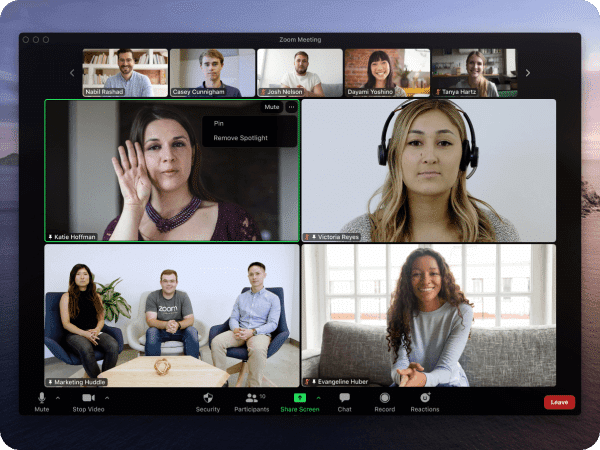
Zoom is a popular cloud-based video conferencing software that’s available as a mobile app and on computer desktops. This software is useful to individuals, organizations, and businesses for hosting online meetings, webinars, and live chats.
Eric Yuan , a Chinese-American businessman, and engineer, is the founder and CEO of Zoom Video Communications Inc — owns 22% of the company’s shares. The company has over 8000 employees.
According to Zoom’s S-1 Filing , more than half of the “Fortune 500” companies use its software which speaks volumes about its credibility.
What is Microsoft Teams?

Unlike Zoom, Microsoft Teams is an all-in-one collaboration and video conferencing software. Nevertheless, it’s not a standalone as it’s offered completely free as with the Microsoft 365 suite package.
The software offers a variety of unified tools that can be used for team collaboration, meetings, and video calls, as well as document and app sharing. The app is available on several devices including Windows, macOS, Linux, Android and iOS.
Zoom vs Microsoft Teams—What Are The Differences?
After a thorough review of Zoom and Microsoft Teams, we found that both offer plenty of similar features. However, we also noticed that there are some key differences in their product offerings.
Here are some features that set both software apart from each other:
- Video Conferencing Capacity
With Microsoft Teams, you can host a virtual meeting with up to 300 participants. On the other hand, Zoom only supports up to 100 participants in a single meeting.
Zoom has a «Gallery View» feature that allows users to simultaneously see all participants in a meeting. On the other hand, Microsoft Teams has a «Together mode» that allows users to see all participants in a shared virtual environment.
Even though the screen sharing feature is present in both software, Microsoft Teams offers additional collaboration features. For example, Microsoft Team also allows users to co-author and co-edit documents in real time which can be useful for collaboration.
Microsoft Teams is bigger than Zoom in terms of available collaboration tools. While Zoom offers the basic “built-in instant messaging features,” Microsoft Teams offers more task management, calendar, and file storage features.
Note: In the end, the best choice between Zoom and Microsoft Teams (or going for an alternative option, like FreeConference) will depend on your specific needs and requirements.
Next, let’s compare Zoom and Microsoft Teams and see how they stack against each other.
Zoom vs Microsoft Teams: Audio and Video Conferencing Capabilities (Zoom Wins)
Based on our review, we found Zoom and Microsoft Team to be almost on par in terms of video and audio conferencing abilities. For one, they both offer high-definition audio and video quality. Also, noise suppression and echo cancellation features are present in both software to improve audio quality.
Audio conferencing is as best as it gets with Zoom and Microsoft Teams. For users who don’t have a camera or microphone, both software provides an alternative option for users joining a meeting via phone. However, while Microsoft Teams require users to join a meeting via dial-in numbers, Zoom users can call a meeting using a telephone.
When it comes to screen view and video layout, Zoom and Microsoft Teams offer users a good way to view all the attendees in a meeting. Zoom has a «Gallery View» feature that lets you see all the participants at once — like the photo gallery on your phone. On the other hand, Microsoft Teams provides a view of the participants in a shared virtual environment with their “Together mode” feature.
In terms of the number of participants supported, both software is suitable for hosting meetings with staff and teams. However, Microsoft Teams is the better choice for larger meetings since it can allow up to 300 participants. Zoom, on the other hand, can only accommodate up to 100 participants in a single meeting.
Recording is another key conference feature that we looked at when comparing both platforms. We found out that both programs let users record meetings. This feature is very helpful for sharing meetings with people who couldn’t attend or for future reference. However, Zoom edges Microsoft Teams in this area because it provides more recording storage choices.
Conclusion: Users can hold effective video and audio conferences using either software. However, Zoom outperforms Microsoft Teams in terms of user experience, video layout, and flexible storage options. In terms of the supported number of attendees in a meeting, Microsoft Teams is way better than Zoom.
Zoom vs Microsoft Teams: Number of Integrations (Microsoft Teams Wins)
Integrating third-party software is not a priority for Zoom. The platform only supports integration with third-party applications like Salesforce and Slack as well as calendaring services like Google Calendar and Outlook. However, Zoom compensates for its few integration options by providing customers with an API feature that enables developers to create custom integrations.
Microsoft Teams, on the other hand, offers a wide range of integration options with other Microsoft products, including Office 365, SharePoint, OneDrive, and more. Additionally, you can integrate the software with other third-party programs like Trello, Asana, and Salesforce. In addition, Microsoft Teams provides a comprehensive collection of developer tools and APIs that enable automation and specialized integrations.
Conclusion: Microsoft Teams is the clear winner in the contest of integration capabilities. The software solution offers a wide range of integration options with other Microsoft tools and third-party apps. Additionally, tech-savvy users can take advantage of their robust APIs and developer tools to create custom integrations and automation.
Note: Microsoft Teams is the ideal all-in-one program for you if you use other Office Suite applications. Before choosing, you should consider the compatibility and ease of integration with Zoom or Microsoft Teams if you have particular requirements or use non-Microsoft solutions.
Zoom vs Microsoft Teams: Pricing (Which Is Worth the Bucks?)
Zoom and Microsoft Teams offer different pricing and subscription options to meet the needs of various organizations.
Zoom’s Pricing:
- Free plan: Zoom offers a free plan that includes basic features such as video and audio conferencing, screen sharing, and instant messaging. However, it has some limitations, such as a 40-minute time limit for meetings with more than two participants and limited storage for recorded meetings.
- Pro plan: The Pro plan is aimed at individual professionals and small teams, costing $14.99 per month per host. It includes all the features of the free plan, plus additional capabilities such as the ability to host meetings with up to 100 participants, cloud recording, and meeting transcripts.
- Business plan: The Business plan is aimed at small and medium-sized businesses and costs $19.99 per month per host. It includes all the features of the Pro plan, plus additional capabilities such as the ability to assign scheduling privileges to other users, manage participants, and use custom branding.
- Enterprise plan: The Enterprise plan is aimed at large organizations, and custom pricing is available; it includes all the features of the Business plan, plus additional capabilities such as the ability to access advanced analytics, enhanced security features, and dedicated customer support.
- Education plan: Zoom also offers an Education plan tailored to meet educational institutions’ needs. It offers similar features to the Pro plan but at a discounted price of $11.99 per host per month.
It’s worth noting that all of these plans come with a 14-day free trial, which allows you to test out the features and capabilities of the platform before committing to a subscription.
Microsoft Teams’ Pricing:
Below are some of the Office 365 plans that come with Microsoft Teams:
- Office 365 Business Basic: Users of this subscription have access to the online versions of popular Office programs like Word, Excel, and PowerPoint. Microsoft Teams is also fully accessible, allowing for online meetings, instant messaging, and teamwork. All this for just $5 per user every month.
- Office 365 Business Standard: This subscription allows users access to the complete, installed Office programs on up to 5 PCs or Macs per user, in addition to the benefits of the Business Basic plan. It also includes email, a calendar, and OneDrive. This plan has a monthly fee of $12.50 per user.
- Office 365 Business Premium: You get all the capabilities offered by the Business Standard package as well as more advanced analytics and security features. Additionally, each user will only cost $20 per month.
- Office 365 E1: This plan includes all the capabilities of the Business Premium plan, plus additional security and compliance tools and comprehensive analytics, for a monthly cost of $8 per user. Ideal for small to medium-sized businesses.
- Office 365 E3 and E5: Both subscriptions have all the capabilities of the E1 plan in addition to more advanced analytics, security and compliance features, and improved communication and collaboration tools. These plans cost, respectively, $20 and $35 per user each month. It is advised for big businesses.
Conclusion: Which is worth the money depends on the unique needs and requirements of your firm. For instance, Microsoft Teams would be a better choice if your company already uses Office 365 and needs a more complete collaboration solution. Zoom would be a more affordable option, though, if you only need basic video conferencing and the free subscription is sufficient.
Note: Consider your organization’s unique demands and requirements together with the costs and features that each platform has to offer before making a choice. Utilize the free trials they provide to check out the functions and features of each site before deciding to subscribe.
While still discussing financial commitment, do you know meeting your basic audio and video conferencing needs can be free? Check our pricing page for more info. For as little as $9.99, you can get access to advanced video conferencing features!
Zoom vs Microsoft Teams: Battle of Features (What Are The Strength and Weaknesses)
Strengths:
Here are some of the areas where Zoom outshines its competitors:
- Ease of use
- Ability to handle a large number of participants (up to 100 people)
- High-definition video and audio quality
- Video layout (with its Gallery view feature)
Microsoft Teams outperforms other similar software in the following areas:
- Integration capabilities with other Microsoft tools and third-party apps
- Developer tools and APIs that allow for custom integrations and automation
- Its comprehensive set of features for virtual meetings
- Its security and compliance features
Weaknesses:
We discover only two major drawbacks to using Zoom:
- Limited integration options with other tools and services
- Limited scalability for larger organizations
Here are some of the cons that come with using Microsoft Teams:
- Its complex interface may be too overwhelming for some users
- Limited support for non-Microsoft file types
- Not suitable for organizations that don’t use Microsoft Office Suite
Best Alternative for Individuals and Small Organizations: FreeConference.com
FreeConference.com is an online video conferencing tool that caters to the conferencing needs of individuals and small businesses. Some of the key features of FreeConference.com include:
- High-definition video conferencing (up to 5 participants)
- Audio conferencing (up to 100 participants)
- Screen sharing
- Recording
- Call scheduling
- Call management
- Dial-in numbers
- Mobile app version
Here are some of FreeConference.com’s shining points:
- Easy to use
- Simple to set up
- Has a free plan which includes all the basic tools you’ll need for your audio and video conferencing needs.
- Offers a mobile app for iOS and Android devices, which allows users to join and participate in calls from their mobile devices.
- It also offers a secure connection (HTTPS) to protect the confidentiality of the calls and the personal information of the participants.
Here are some drawbacks we found with FreeConference.com:
- Limited features compared to other more advanced platforms such as Zoom and Microsoft Teams
- It’s mainly focused on audio conferencing and screen sharing
- The video conferencing feature is only available for up to 5 participants, which may need more for larger meetings or events.
- It does not offer integration with other apps and calendar systems and does not have collaboration tools like task management, calendar, and file storage.
Zoom vs Microsoft Teams: Security Test
Both Zoom and Microsoft Teams place a high priority on security and assert that they have taken numerous precautions to safeguard the data and privacy of their users.
Zoom:
Industry-standard security capabilities are made available to Zoom customers, including end-to-end encryption for paid subscriptions, the capacity to password-protect meetings, and the capacity to lock meetings to bar illegal admission.
It’s crucial to remember that Zoom has previously experienced security concerns, such as the «Zoom-bombing» situations when unauthorized individuals may enter meetings and cause disruptions.
They successfully addressed these problems by introducing additional security measures, such as making waiting rooms available by default, banning the distribution of meeting links on social media, and allowing the host to manage screen sharing.
Additionally, they have consistently worked to enhance their security measures and place a strong emphasis on being more open about their data protection procedures.
Microsoft Teams:
A few security integrations that makeup Microsoft Teams’ defense system include end-to-end encryption, multi-factor authentication, and conditional access controls.
Additionally, because this software is an integral component of the Office 365 suite, users will definitely benefit from all the additional features. Specifically, Microsoft Teams receives extra security features from the Office 365 and Azure platforms, including eDiscovery, compliance, and data loss prevention tools.
On a final note, another thing worthy of mention is that Microsoft Teams, unlike Zoom, has never experienced any known security breach or major security difficulties.
Zoom vs Microsoft Teams: Customer Support (It’s a Tie)
Both Zoom and Microsoft Teams provide customer support services that are on par with industry standards. They both give their consumers a thorough knowledge base, a community forum, and a variety of ways for users to receive assistance. Be aware that while customer assistance is available 24/7 for subscription plans, it is not always available for free programs.
Conclusion: In terms of customer support services, your choice between the two software would depend on your personal preference. However, before you make a decision, we recommend you check the customer support service of each company to see if it matches your organization’s specific needs and requirements.
We Value our Customers
Here at FreeConference.com, our clients come first. In today’s hectic business world, reliable and secure communication is crucial, thus we are committed to giving our customers the greatest video and audio conferencing experience.
Our platform is simple to use and allows anyone to arrange calls, take part in them, share their screen, and record sessions. You can begin utilizing our service without making any commitments thanks to our free plan.
We are dedicated to offering excellent customer service, and we offer a variety of ways for users to get assistance, including email, phone, and online chat. Users can also access our extensive knowledge base and community forum to get answers to frequently asked topics and to exchange advice and solutions with other users.
Zoom vs. Microsoft Teams: Customer Reviews
Zoom:
After reading through a large number of customer reviews for Zoom, we found that the majority of them highlight the software’s user-friendly design as their favorite aspect. Users have expressed their appreciation for the platform’s high-definition video and audio capabilities as well as its capacity to manage sizable gatherings.
One of the platform’s key advantages was also mentioned in some of the reviews as being its scalability and adaptability. Most people, small businesses, and major organizations use the platform for this reason.
However, there have reportedly been some security concerns with the platform in the past, particularly with «Zoom-bombing» situations when unauthorized attendees entered meetings and caused disruptions.
Even if Zoom has resolved these problems, they nonetheless give the company a terrible reputation.
Microsoft Teams:
The majority of the customer reviews we found for Microsoft Teams are favorable. Almost all of its consumers praised its extensive range of virtual meeting features. Its ability to integrate with other Microsoft tools and third-party applications, as well as its developer tools and APIs that enable customized integrations and automation, were also highlighted as essential characteristics.
The platform’s security and compliance aspects have also been cited by several users as strengths. Some users, however, claimed that the platform is overly complicated and confusing. According to some of its customers, the limited compatibility for non-Microsoft file types may also be limited.
Our Users Love Us
Many of our consumers have expressed appreciation for our platform’s user-friendliness, simplicity of setup, and availability of a free plan in their favorable feedback. The majority of customers value the fact that anyone can join and take part in calls from their mobile devices thanks to our mobile app, which is available for iOS and Android smartphones.
Additionally, some users mentioned our security function as one of the aspects of our services that they enjoy. They value how the calls’ confidentiality and the participants’ personal information are protected by a secure connection (HTTPS).
Conclusion
Zoom and Microsoft Teams lived up to their names as powerful collaboration tools in our review. Both software offers amazing features that can help organizations and businesses stay connected and increase productivity. But, which one is the best?
We found out in our review that the best online conferencing software would depend on your needs and preferences. For example, Zoom is a great option if you prefer a more streamlined, user-friendly platform for your online conferencing needs. On the other hand, Microsoft Teams would be an ideal option if you want robust features and integrations with other Microsoft products.
However, we recommend you stay open to other options in 2023. Re-evaluate your needs and try out other platforms like FreeConference.com. You might be surprised to find a video conferencing tool that gets the job done at a lesser price.
If you’re still not convinced, try out the free version by clicking here.
Host a Free Conference Call or Video Conference, Starting Now!
Create your FreeConference.com account and get access to everything you need for your business or organization to hit the ground running, like video and Screen Sharing, Call Scheduling, Automated Email Invitations, Reminders, and more.
Что лучше zoom или teams
Оформить бесплатный доступ на 30 дней к Microsoft 365
Что лучше: Microsoft Teams или Zoom?
Ранее видеоконференции, видеозвонки между коллегами, онлайн обучение не были столь популярны как сейчас. В виду сложившихся обстоятельств, коммуникации пришлось перестроить. Все поняли удобство и практичность проведения онлайн встреч.
Ранее видеоконференции, видеозвонки между коллегами, онлайн обучение не были столь популярны как сейчас. В виду сложившихся обстоятельств, коммуникации пришлось перестроить. Все поняли удобство и практичность проведения онлайн встреч: экономия времени на дорогу, возможность собирать большое количество участников, без необходимости аренды помещения, и другие преимущества. С марта 2020 года количество пользователей видеосервисов увеличилось в сотни раз. Лидерами на рынке стали Microsoft Teams и Zoom.
Количество пользователей Microsoft Teams: ноябре 2019 — 20 миллионов, в марте 2020 – 44 миллиона, а в ноябре 2020 количество ежедневных активных пользователей Microsoft Teams достигло 115 миллионов человек.
Количество пользователей Zoom: в декабре 2019-го у сервиса было 10 млн ежедневных пользователей, в марте 2020-го — уже 200 млн.
В чем же их сходства и различия?
Zoom – это облачная платформа для видео и аудио конференций, звонков, мобильного сотрудничества и простых онлайн-встреч. Zoom по-прежнему предлагает вариант freemium, который в первую очередь привлекает новых клиентов.
Microsoft Teams – это платформа для совместной работы, которая объединяет вместе чат, онлайн встречи, конференции и сервисы Microsoft 365. То есть Microsoft Teams это не только видео или аудио связь. Это хаб, обьединяющий различные сервисы для работы: от звонков до планнера больших проектов.
Оба приложения доступны в мобильной и десктопной версиях. Базовый набор для звонков и чата может казаться одинаковым, однако это лишь верхушка айсберга.
Функционал
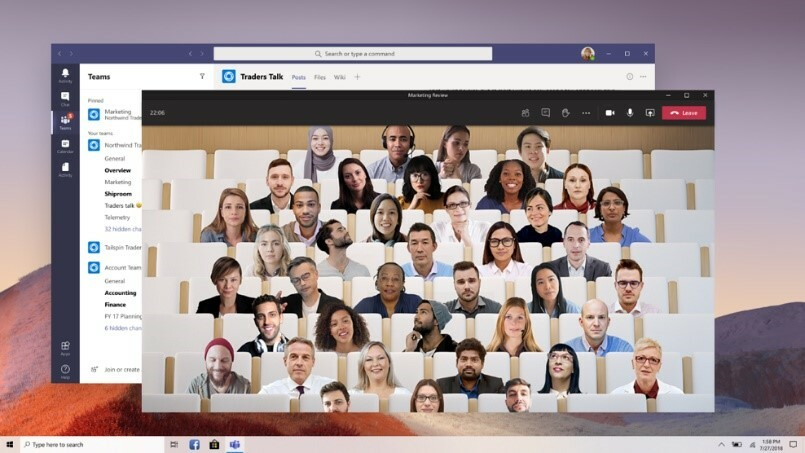
Наложение заднего фона, несколько экранов участников одновременно, возможность отключить микрофоны других участников: у обоих приложений данный набор практически одинаков. В приложениях имеется возможность вывода на экран до 49 видеоизображений участников конференции. В Microsoft Teams дополнительно возможно «рассадить» всех участников в одной аудитории – Together Mode.
Возможность чатиться предоставляется и Teams, и Zoom. Как отдельная функция, так и как часть конференции. Рассматривая чат, как сервис, в обоих приложениях возможно разбиение по каналам, группам, поиск и персональная переписка.
Если говорить про чат, как часть конференции, то имеются различия.
Когда встреча в Teams окончена, чат события остается и продолжает «жить»: вы в любой момент можете написать сообщение, опубликовать файл, отправить эмодзи. Чат находится среди ваших остальных переписок и вам легко будет его найти.
В Zoom автосохранение системы автоматически сохраняет чат конференции локально на ваш компьютер. Вы также можете вручную сохранить ваш чат при запуске локальной записи или записи в облако. То есть, вы только пересматриваете уже имеющуюся информацию, без возможности добавить новую.
Сколько будет жить ваша конференция?
Microsoft Teams позволяет начать работу с коллегами еще ДО начала трансляции: сообщения в чат, файлы для совместной работы, вопросы спикерам и модераторам. Во время встречи имеется возможность делать заметки в соответствующей вкладке. И, как отмечено ранее, ваш чат продолжает жить.
Начало конференции в Zoom происходит по переходу по ссылке, вводу идентификатора видеовстречи и пароля в указанное время. Тогда у вас появляется функция чата (если организатор ее включит).
Запись конференции (видео) возможна у обоих сервисов.
Облачные записи Microsoft Teams хранятся в защищенном корпоративном Microsoft Stream и доступны для членов организации. Microsoft Stream включает базовый объем хранилища. Клиент Microsoft Stream получает фиксированное выделенное хранилище на 500 ГБ и дополнительно 0,5 ГБ хранилища на лицензированного пользователя.
Приобрести дополнительное хранилище можно за $100 за 500 ГБ в месяц на каждого пользователя.
Облачные записи Zoom хранятся в облаке Zoom и, в зависимости от тарифного плана, у хранилища ваших записей может быть разный объем (0,5 ГБ, 1 ГБ). За дополнительную стоимость можно приобрести дополнительный объем (от $40 за 100 Бб в месяц дополнительно к тарифному плану, $100 за 500 ГБ в месяц). Или вы можете сохранять записи локально.
Интеграция с другими приложениями
В данном вопросе оба сервиса предоставляют большой выбор возможных интеграций. Календари, системы мониторинга задач, планнеры и многое другое. Существенное отличие в интеграции с офисными пакетами приложений (Microsoft Office, GSuite, OpenOffice и др.). Zoom имеет коннектор с GSuite, однако количество пользователей данного сервиса существенно меньше, чем пользователей Microsoft Office. Teams, в свою очередь, часть экосистемы Microsoft Office, что позволяет пользоваться офисными приложениями в самом Teams. Набор сервисов для интеграции разный, поэтому перед выбором Teams или Zoom, ознакомьтесь с перечнем приложений на сайтах производителей.
Общее сравнение функционала: