Visual Studio vs. Visual Studio Code: How to choose

For decades, when I got to work in the morning, I would start Microsoft Visual Studio (or one of its predecessors, such as Visual C++ or Visual InterDev), then brew tea and possibly attend a morning meeting while it went through its laborious startup. I would keep the IDE open all day as I went through develop/test/debug cycles to avoid another startup delay. When I worked on a C++ project with ~2 million lines of code, I also jump-started each day’s work by automatically running a batch script that did a code checkout and full rebuild of the product in the wee hours.
The startup overhead of Visual Studio has decreased significantly over the years, by the way. It’s now a non-issue even in huge Visual Studio 2022 projects.
Meanwhile, Visual Studio Code usually starts up quickly enough that I can be productive in a few minutes, even for large projects. I said usually, not always: Visual Studio Code itself needs a monthly update, and the many extensions I have installed often need their own updates. Still, even updating a dozen extensions in Visual Studio Code takes much less time than Visual Studio used to take to rebuild the symbol tables of a large C++ project.
Still, choosing between Visual Studio Code and Visual Studio is not as simple as choosing between a lightweight editor and a heavyweight IDE. While Visual Studio Code is highly configurable, Visual Studio is highly complete. Your choice may depend as much on your work style as on the language support and features you need. Let’s take a look at the capabilities and the trade-offs of these two development tools.
What is Visual Studio Code?
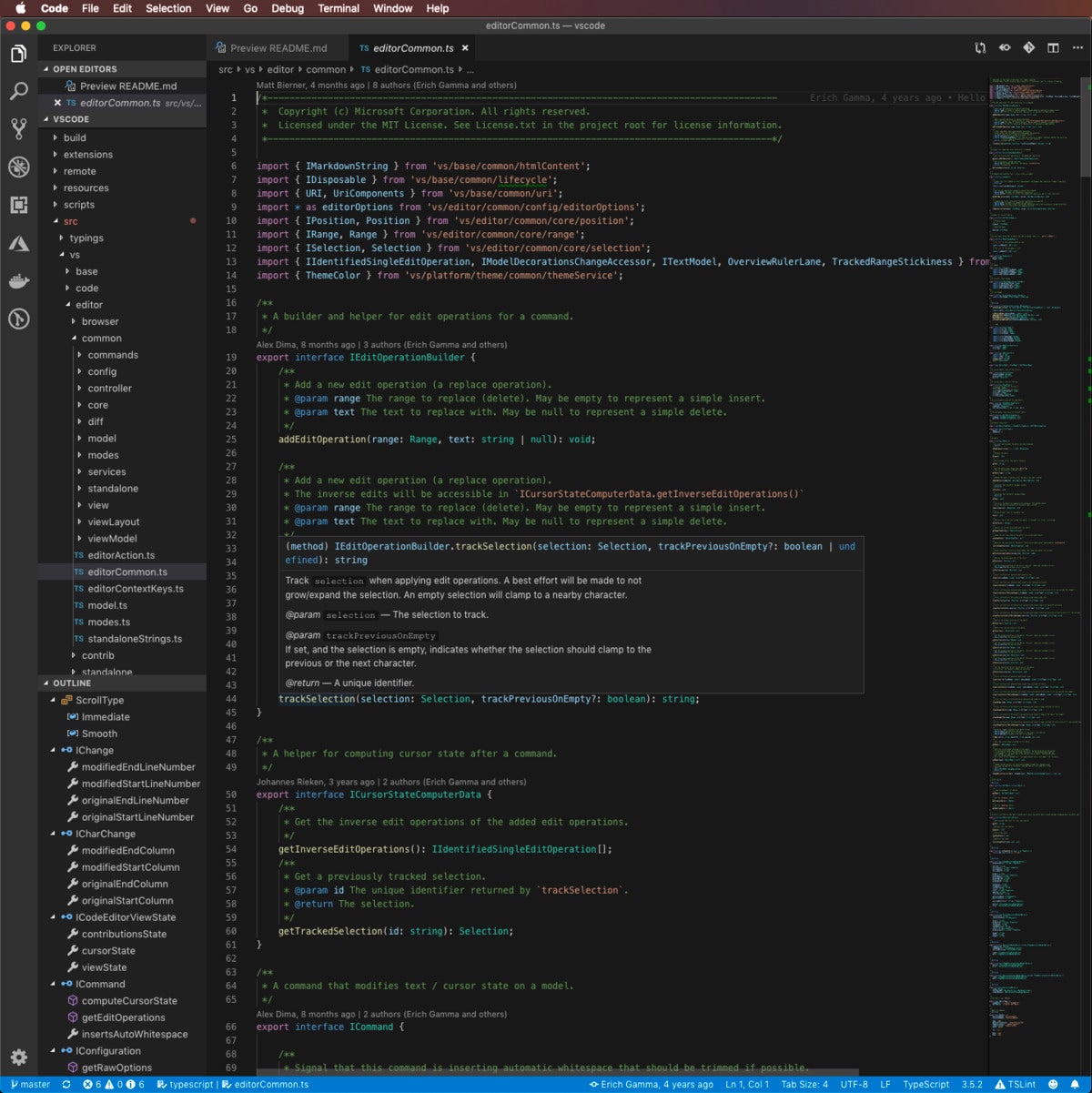
Visual Studio Code is a lightweight but powerful source code editor that runs on your desktop and is available for Windows, macOS, and Linux. It comes with built-in support for JavaScript, TypeScript, and Node.js and has a rich ecosystem of extensions for other languages (such as C++, C#, Java, Python, PHP, and Go) and runtimes (such as .NET and Unity).
Aside from the whole idea of being lightweight and starting quickly, VS Code has IntelliSense code completion for variables, methods, and imported modules; graphical debugging; linting, multi-cursor editing, parameter hints, and other powerful editing features; snazzy code navigation and refactoring; and built-in source code control including Git support. Much of this was adapted from Visual Studio technology.
VS Code proper is built using the Electron shell, Node.js, TypeScript, and the Language Server protocol, and is updated on a monthly basis. The extensions are updated as often as needed. The richness of support varies across the different programming languages and their extensions, ranging from simple syntax highlighting and bracket matching to debugging and refactoring. You can add basic support for your favorite language through TextMate colorizers if no language server is available.
The code in the VS Code repository is open source under the MIT License. The VS Code product itself ships under a standard Microsoft product license, as it has a small percentage of Microsoft-specific customizations. It’s free despite the commercial license.
What is Visual Studio?
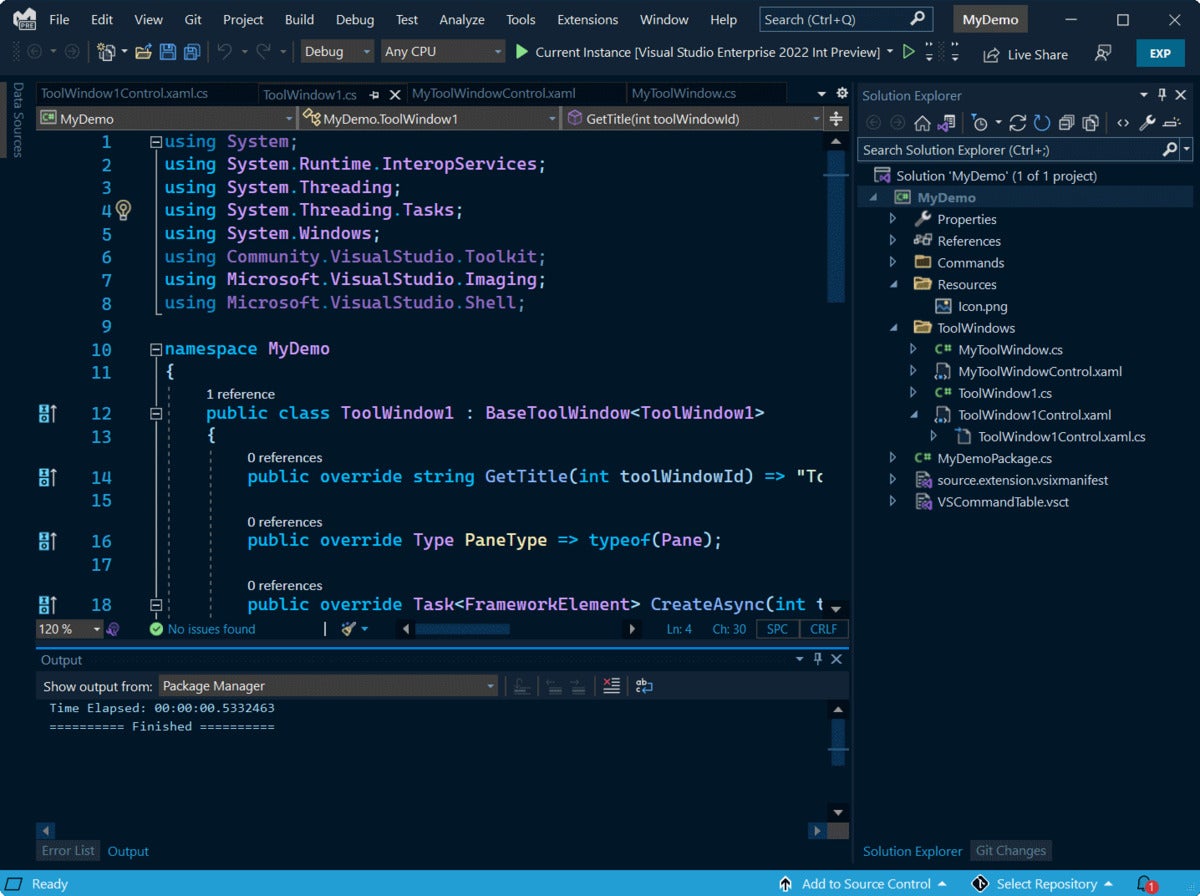
Visual Studio (current version Visual Studio 2022, which is 64-bit) is Microsoft’s premier IDE for Windows and macOS. With Visual Studio, you can develop, analyze, debug, test, collaborate on, and deploy your software.
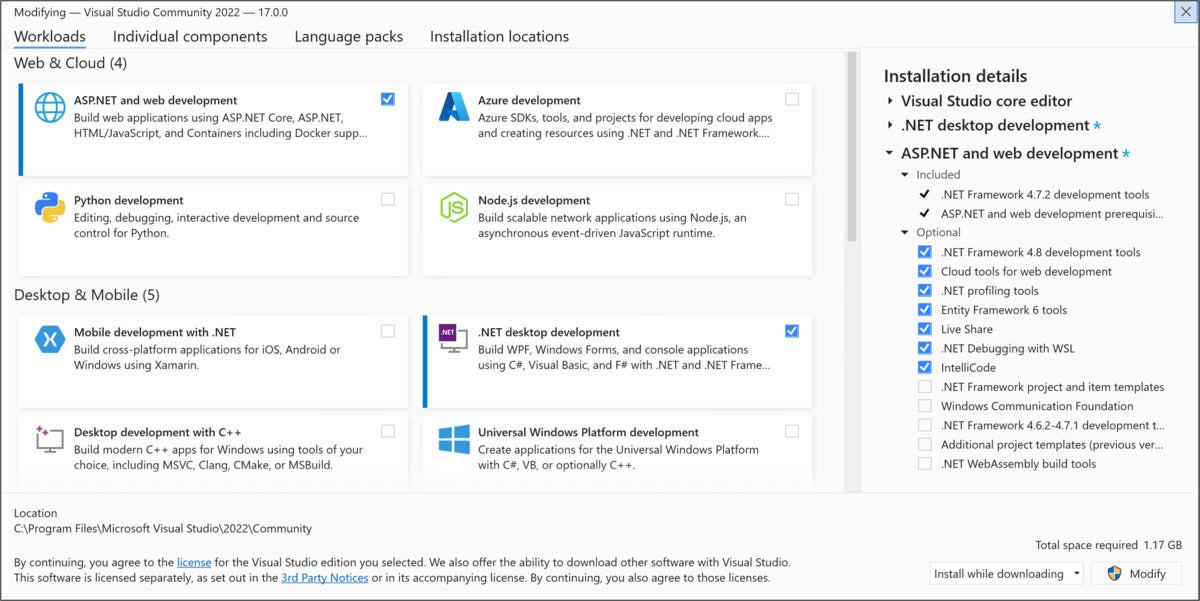
On Windows, Visual Studio 2022 has 17 workloads, which are consistent tool and component installation bundles for different development targets. Workloads are an important improvement to the Visual Studio installation process, because a full download and installation of Visual Studio 2022 can easily take hours and fill a disk, especially an SSD.
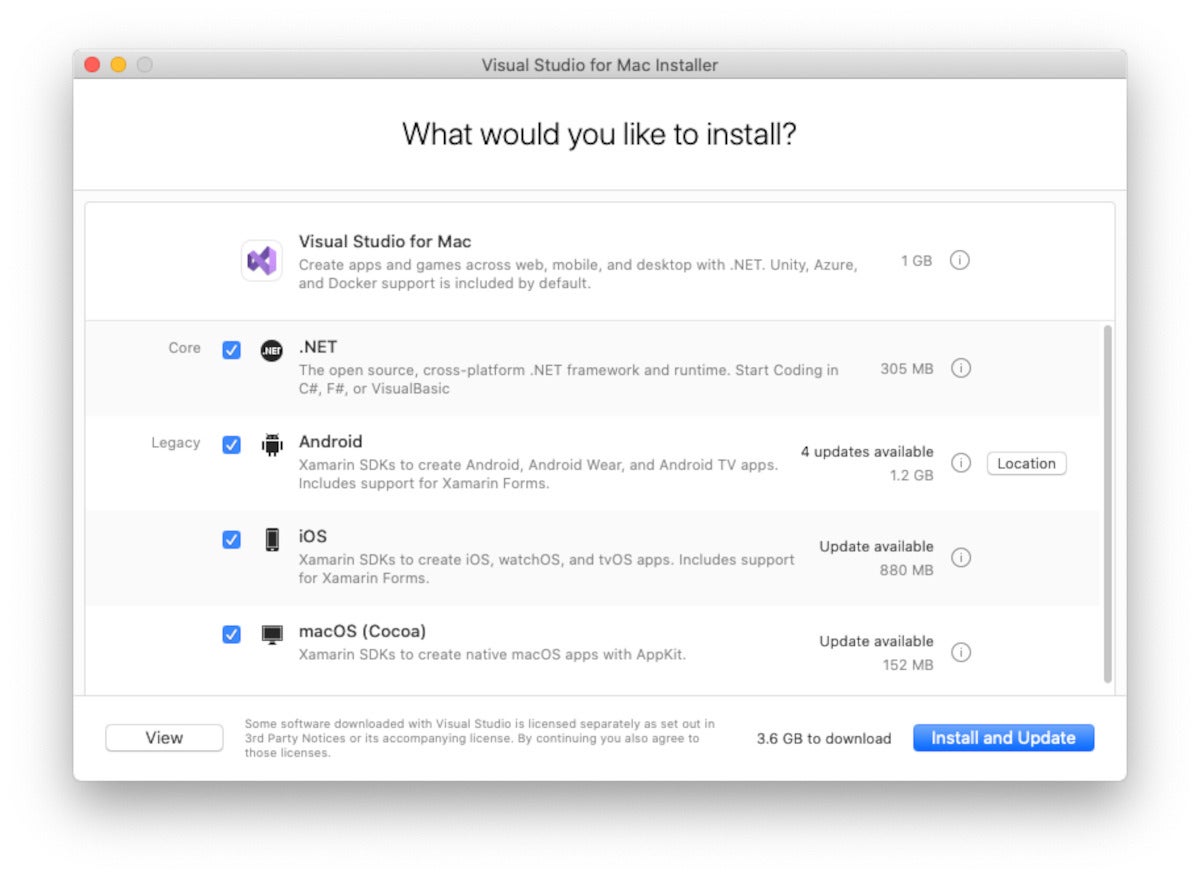
Visual Studio 2022 for Mac has a less complicated installer than the Windows version, mostly because it doesn’t support as many targets. It allows you to develop for web, mobile, and desktop with .NET, with Unity, Azure, and Docker support included by default. The .NET Core, Android, iOS, and macOS targets are optional; the latter three use Xamarin.
Visual Studio 2022 comes in three SKUs: Community (free, not supported for enterprise use), Professional ($1,199 first year/$799 renewal), and Enterprise ($5,999 first year/$2,569 renewal). The Enterprise Edition has features for architects, advanced debugging, and testing that the other two SKUs lack.
Visual Studio or Visual Studio Code?
You would think that deciding between Visual Studio and Visual Studio Code for any given software development task would be as simple as deciding between an IDE and an editor. It’s not, mostly because VS Code can be configured to be quite close to an IDE for many programming languages. However, along with this configurability come a number of trade-offs.
For example, if your development style is test-driven, Visual Studio will work right out of the box. On the other hand, there are more than 15 test-driven development (TDD) extensions for VS Code supporting Node.js, Go, .NET, and PHP. Similarly, Visual Studio does a good job working with databases, especially Microsoft SQL Server and its relatives, but VS Code has lots of database extensions. Visual Studio has great refactoring support, but Visual Studio Code implements the basic refactoring operations for half a dozen languages.
There are a few clear-cut cases that favor one IDE over the other. For instance, if you are a software architect and you have access to Visual Studio Enterprise, you’ll want to use that for the architecture diagrams. If you need to collaborate with team members on development or debugging, then Visual Studio is the better choice. If you need to do serious code analysis or performance profiling, or debug from a snapshot, then Visual Studio Enterprise will help you.
VS Code tends to be popular in the data science community. Nevertheless, Visual Studio has a data science workload that offers many features.
Visual Studio doesn’t run on Linux; VS Code does. On the other hand, Visual Studio for Windows has a Linux/C++ workload and Azure support.
For daily bread-and-butter develop/test/debug cycles in the programming languages supported in both Visual Studio and VS Code, which tool you choose really does boil down to personal preference. If you tend to work on a development project for hours at a time, then Visual Studio might be a better fit. If you tend to dip into development for brief periods, and rotate between other tasks, then Visual Studio Code might make you happier.
Next read this:
- The best open source software of 2023
- Do programming certifications still matter?
- Cloud computing is no longer a slam dunk
- What is generative AI? Artificial intelligence that creates
- Coding with AI: Tips and best practices from developers
- Why Wasm is the future of cloud computing
- Visual Studio
- Microsoft
- Development Tools
- Software Development
- Integrated Development Environments
- Enterprise Buyers Guide
Martin Heller is a contributing editor and reviewer for InfoWorld. Formerly a web and Windows programming consultant, he developed databases, software, and websites from 1986 to 2010. More recently, he has served as VP of technology and education at Alpha Software and chairman and CEO at Tubifi.
Copyright © 2022 IDG Communications, Inc.
Visual Studio vs Visual Studio Code – What’s The Difference Between These IDE Code Editors?

Kolade Chris
The first time I heard about “Visual Studio”, I thought it was the same as “Visual Studio Code”. I don’t know why Microsoft decided to confuse everyone with the names of those two development tools. But that’s a story for another day.
“Visual Studio” and “Visual Studio Code” are not the same thing. Visual Studio is an integrated development environment (IDE) and Visual Studio Code is a rich text editor like Sublime Text and Atom.
But the difference between the tools is more than just IDE and text editor.
An IDE is a robust tool for writing, editing, debugging, and running your code. A text editor only lets you write and edit your code. You might have to step out of a text editor to run your code or download plugins to help it do the running for you.
In this article, you’ll learn the main differences between Visual Studio and Visual Studio Code. But firstly, we need to know what “Visual Studio” is and what “Visual Studio Code is” before diving into those differences.
What We’ll Cover
- What is Visual Studio?
- What is Visual Studio Code?
- What is the Difference between “Visual Studio” and “Visual Studio Code”?
- Which should you Choose between “Visual Studio” and “Visual Studio Code”?
- Conclusion
What is Visual Studio?
Visual Studio was first released in 1997 by Microsoft. It’s an integrated development environment (IDE) for developing, editing, and debugging websites, web, and mobile applications as well as cloud services.
Because it’s an IDE, programming utilities like a debugger, compiler, intellisence, and more are all bundled into it for you.
Visual Studio comes with built-in support for C# and .NET. It also supports other programming languages like C, C++, Python, F#, web languages (HTML, CSS, JavaScript), and a lot more. Support for Java was removed back in Visual Studio 2017.
Visual Studio runs on Windows and Mac. It has 3 editions – community, professional, and enterprise. The community version is free, while the professional and enterprise are not.
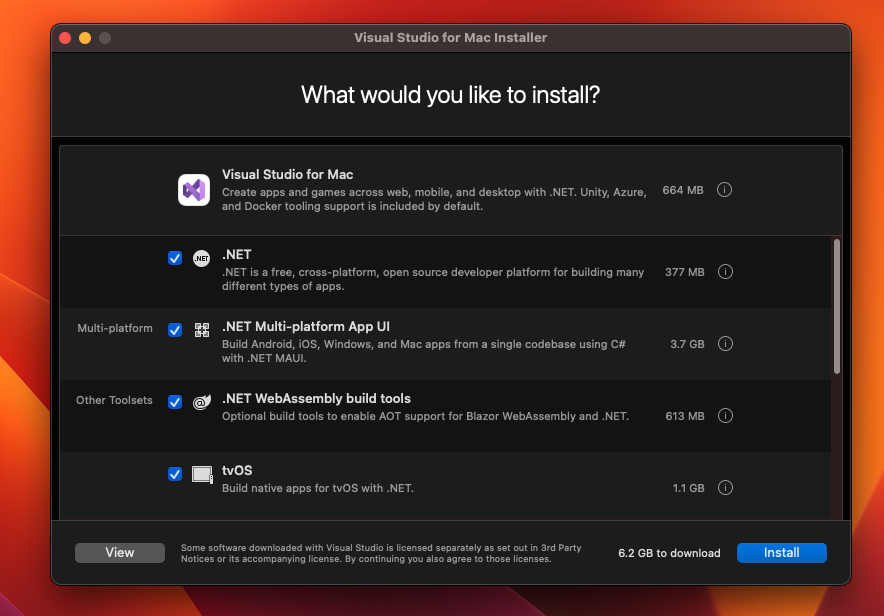
The installation is quite a bit more robust on Windows than Mac. So, on Windows, you might have to download more than 42 GB depending on what you want to do.

But on Mac, as of the time of writing this article, you need around 6.2 GB of disk space.
What is Visual Studio Code?
Visual Studio Code (also called VS Code) is like the mini version of Visual Studio. It is an open-source and lightweight text editor available on Windows, Mac, and Linux. There’s also the web version available at https://vscode.dev/ .
VS Code comes with built-in support for JavaScript, TypeScript and Node JS, but you can use it to code in any language you want. All you need to do is download the relevant extensions.
Some of the extensions are made by Microsoft, but a lot of others are third-party extensions.
Unlike Visual Studio, you don’t need much space to download VS Code. You might not need more than 200 MB of disk space to download it.
Since it supports JavaScript, TypeScript, and Node JS by default, you get a debugger and intellisence, too. But to get intellisence, a compiler, and debuggers for other languages, you have to download relevant extensions.
Now you know that Visual Studio is an IDE and Visual Studio Code is a text editor. So let’s summarize their main differences next.
What is the Difference between “Visual Studio” and “Visual Studio Code”?
| Basis | Visual Studio | Visual Studio Code |
|---|---|---|
| Type | Visual Studio is a full-fledged IDE | VS Code is a text editor (AKA Code editor) |
| Platform | Visual Studio runs on Windows and Mac | VS Code runs on Windows, Mac, and Linux |
| Size | Visual Studio is relatively large. You might have to download more than 40 GB on Windows and over 6 GB on Mac | VS Code does not require more than 200 MB on any platform |
| Support | Visual Studio has built in support for C# and .NET, alongside several common languages apart from Java | VS Code supports JavaScript, Typescript, and Node JS out of the box. It also supports other programming languages – as long as there’s an extension(s) for that |
| Pricing | Visual Studio Community Edition is free, but the professional and enterprise editions code $45 and $250 per month respectively. | VS Code is free. Most of the extensions are also free but there are freemium ones |
| Extensions | Visual Studio does not have as many extensions as VS Code | VS Code has numerous professionally and curated extensions for various purposes |
Which should you Choose between “Visual Studio” and “Visual Studio Code”?
There has been a long-running debate about which is better and which to choose between Visual Studio and Visual Studio Code. Well, it depends on what you are doing.
If you’re developing exclusively with a language supported by Visual Studio such as C#, C, C++, Python, and others, Visual Studio or other relevant IDEs are likely the best option for you.
But even if you’re developing in those languages but you require a React, Vue, or Angular frontend, VS code might be the best option for you.
If you’re working in a team, they might provide you with the enterprise version of Visual Studio, or any other IDE that correlates with the language you are working with. For example, PyCharm for Python and IntelliJ Idea for Java.
If you’re using Linux, you have to choose Visual Studio Code or some other IDE apart from Visual Studio. That’s because Visual Studio does not run on Linux.
If you’re the kind of person that likes to customize your editor to your taste, just go for VS Code because it’s highly customizable. You also should probably choose VS Code if you are mixing technologies.
Conclusion
This article showed you the differences between Visual Studio and VS Code, and also what they both are separately.
The debate should never be which one is better than the other, but which is best for what you want to do, or what you need. That’s why we looked at some scenarios that might encourage you to choose one over the other.
Какая разница между Visual Studio Code и Visual Studio
Первый этой синий ярлык, второй фиолетовый ярлык. Какая между ними разница?
Голосование за лучший ответ
Ну ты сам ответил на свой вопрос..
Огромная разница. Обе программы созданы Microsoft. Обе предназначены для программистов. На этом сходства заканчиваются.
Visual Studio Code — это «Блокнот» с кучей плагинов. Плагины пишут не только в Microsoft.
Visual Studio — это традиционная среда разработки с поддержкой нескольких языков программирования. Вместе с Visual Studio устанавливаются компиляторы C++ и C# (если они выбраны в списке компонент)
Ray BeldenУченик (80) 1 год назад
Отличия же есть, на*уя 2 программы одинаковых делать?
Дед Мазай Гений (58061) Ray Belden, зачем существует десяток других IDE? Зачем десятки текстовых редакторов? Зачем десятки графических редакторов? Зачем VK, если есть Facebook? Зачем WhatsApp, если есть Skype?
В том, что это две разные программы. Сходство только в названии.
Ray BeldenУченик (80) 1 год назад
Your Ultimate Guide To Visual Studio vs Visual Studio Code
Are you stuck in the vivid debate of visual studio vs visual studio code? The battle between the two will entirely depend on the work you are doing, your working style, the languages you each support, and the features you require. There are plenty of ways to decide the best for you!
If you’ve been in the same boat as all of us about choosing the right editor, it is because both are Microsoft-made. It is pretty evident since both of them have a similar name. Despite the similarity in their names, their features are pretty much different.
Microsoft’s Visual Studio, also known as Integrated Development Environment (IDE), is a full-bodied text editor for developers. It is beloved by millions of developers across the world. It comes with many robust development, debugging and collaborative features, but the Visual Studio Code is standing in its way, which is a tough competitor. You cannot simply ignore it too.
Let’s pour some water on the heated debate of Visual Studio vs Visual Studio Code by looking at their capabilities, pricing, utility, and what’s the best for you!
Table of Contents
- 1. What is Microsoft Visual Studio?
- 1.1. Is Visual Studio an IDE?
- 2. What Is Visual Studio Code?
- 3. Utility
- 3.1. Visual Studio vs Visual Studio Code
- 4. Visual Studio vs Visual Studio Code — Differences
- 5. Visual Studio vs Visual Studio Code — Pricing
- 6. Why choose one over the other?
- 6.1. Why should VS Code be your choice?
- 6.2. Why Should Visual Studio Be Your Choice?
- 7. Final Words
What is Microsoft Visual Studio?
Is Visual Studio an IDE?
VS is an Integrated Development Environment and is Microsoft’s creative launching pad that developers can use to build, edit, and debug code, after which one can easily publish the app they are building.
Visual Studio’s great editing and debugging capabilities distinguish it from its competitors. Visual Studio also includes code completion tools, compilers, graphic designers, etc., to ease a developer’s process of building an app.
Visual Studio aims at being a feature-rich, robust, and comprehensive solution for building apps.
What Is Visual Studio Code?
Visual Studio Code or VS Code is a text editor that offers multiple customisable features in the form of plugins for developers to curate a pretty selective development environment. VS Code is lightweight and powerful and can be easily installed on any platform.
VS Code has built-in support for Node.js, TypeScript, and JavaScript and a feature-rich extension ecosystem for different languages like C++, Java, C#, PHP, Go, and Python.
Visual Studio Code falls in the same category as Atom, Sublime, and Text Wrangler, but with better and more robust features.
A developer branching out of .NET or C# into different comment stacks will be the ideal candidate for VS Code. It will also benefit those starting their journey of being a developer from scratch!
VS Code is centred around ease, extensibility, speed, and flexibility.
Utility
Visual Studio vs Visual Studio Code
Visual Studio aids in developing computer programs, websites, web applications, mobile applications, and web services. Visual Studio or IDE takes the help of Microsoft’s software development platform, i.e., Windows API, Windows Presentation Foundation, Windows Forms, Microsoft Silverlight, and Windows Store, to produce and manage native code.
Whereas Visual Studio Code can be used to write, edit, and debug the code, all in one place. VS Code supports many programming languages, for which a developer does not require Web Support. Everything can be found in its built-in multi-language support.
A developer can rely on Visual Studio Code for all kinds of development, as long as they pair it with the right tools. VS Code comes with built-in support for JavaScript, Node.js, and TypeScript. If this is not enough, one can easily add the necessary support for languages like Python, C#, PHP, Java, and many more by installing their extensions.
The primary reason why VS Code seems better in terms of usage in this debate of Visual Studio vs Visual Studio Code is that it offers incredible support, it can work across all platforms, and is lightweight and robust. It can do everything in just one place.
Visual Studio vs Visual Studio Code — Differences
| Visual Studio | Visual Studio Code |
|---|---|
| Visual Studio is an Integrated Development Environment, also known as an IDE. | Visual Studio Code is a code editor. A developer can easily edit their code. |
| VS is slower when it comes to performing across different platforms. The processing speed is slower. | VS Code is comparatively faster. |
| Visual Studio has a free editor for developers to use but also comes with a better and paid IDE version. | VS Code is completely free of cost and is open-source. |
| VS engages the best and the most advanced IntelliSense. | IntelliSense is comparatively not up to the mark in VS Code. |
| The overall download size is pretty large. | Compared to Visual Studio, Visual Studio Code is pretty lightweight. It doesn’t require a heavy or large download. |
| VS requires more space to work better and smoother. | VS Code comparatively does not need a lot of space to run. It can easily run on 300 MBs of ram. |
| Visual Studio only runs on macOS and Windows. | VS Code can run on macOS, Windows as well as Linux. |
| Not many professionally developed plugins are available for Visual Studio. | VS Code comes with a wide range of professionally curated plugins and extensions to meet all kinds of editing and compiling needs. |
Visual Studio vs Visual Studio Code — Pricing
When it comes to pricing, the debate of Visual Studio vs Visual Studio Code has become even more heated!
Unlike IDE or Visual Studio, Visual Studio Code is open source and free of cost. Many contributors in the Microsoft Visual Studio community work every day to ensure VS Code is working perfectly fine. The cost-saving aspects of using VS Code are incredible for smaller teams or freelance developers.
On the other hand, Visual Studio can cost $45 a month or $1,199 for the first 12 months of usage. After the first 12 months are complete, a developer must pay $799 to use it yearly to gain the perpetual license. As far as the Enterprise version of VS Code is concerned, the numbers go a notch higher — $250 a month, then $5,999/ year, and subsequently $2,569/year.
It should be noted here that the Community version of VS Code is free to use worldwide.
Why choose one over the other?
Why should VS Code be your choice?
For 90% or more developers, VS Code is a better choice for solving the never-ending debate of Visual Studio vs Visual Studio Code.
- VS Code is a cross-platform code editor that can easily run on macOS, Windows, and Linux. All the web technologies VS Codes use Electron Framework in the end, meaning the applications built through VS Code are lean and seamless when updating them.
- VS Code is comparatively much faster than Visual Studio. It can boot up faster when compared to IDE.
- Visual Studio Code is incredibly flexible. It can do pretty much whatever a developer wants it to do. Even though it is designed to be a code editor, you can replicate what an Integrated Development Environment does on the same.
- VS Code, compared to Visual Studio, is pretty simple and smooth in terms of development experience. VS Code is pretty streamlined and straightforward, so a developer does not get tangled in any complexities.
- Visual Studio Code is the best choice for web development. It offers incredible support with thousands of tools and extensions willing to work in your favour.
Why Should Visual Studio Be Your Choice?
Most of its features are insignificant for some developers, no matter how great VS Code is. For them, Visual Studio is the best choice.
- Visual Studio is functionally feature-rich. In most cases, Visual Code matches the requirements of most developers perfectly without having to rely on further extensions or plugins.
- In Visual Studio, collaborating with your entire team is pretty easy when it comes to development as well as debugging code. The workflow is super-smooth and is loaded with all kinds of features one would need in the long run.
- When it comes to heavy-duty code analysis, debugging as well as performance profiling, Visual Studio is an incredible option.
- Visual Studio is pretty commonly used in the game development industry. For instance, UNITY, a multi-platform environment integrated with Visual Studio, can work effortlessly to build cross-platform mobile gaming applications, AR/VR applications, and more!
Final Words
When deciding in this tug of war of Visual Studio vs Visual Studio Code, you should consider your particular needs. If your needs gravitate more towards .net development or C#, you should be looking forward to using Visual Studio. IDE will be excellent for your requirements.
However, if your needs gravitate towards cross-stack development, you should be using Visual Studio Code. The lightweight, premium, straightforward, feature-rich code editor will be your best friend for years to come.
Visual Studio Code, though, has replaced Visual Studio around the world for most developers. However, IDE continues ruling our developer’s community regarding fulfilling complex development needs.
If you are still confused about this never-ending Visual Studio vs Visual Studio Code debate or are looking forward to utilizing your skills on the two platforms, apply at Turing. Register with us and see what you’re missing from your life!